Humaans setup
Humaans connects through the unified HRIS connector. This page covers the Humaans-side configuration you complete first. Once it's done, add the connector in Mesh by following Connect your HR system.
You finish with one value: an API access token.
Before you start
You need admin permissions in your company's Humaans instance, or a colleague who has them.
These steps reflect Axiad's current understanding of Humaans' configuration. Because Humaans is a third-party product, there may be variations between your experience and what this guide describes, depending on the version in use and recent updates.
If you find a significant difference, or anything that doesn't make sense, let us know through Axiad support.
Step 1 — Open API access tokens
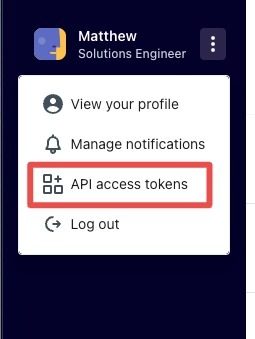
Sign in to Humaans, select the three dots in the sidebar to expand the menu, and choose API access tokens.
Step 2 — Create or edit a token
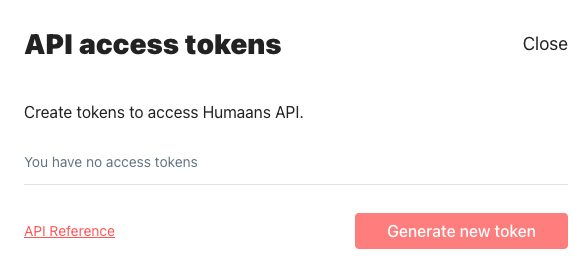
If you already have a token, you can edit it to adjust its scopes. Otherwise select Generate new token.
Step 3 — Choose the scope
This choice materially changes what Mesh can tell you.
| Scope | What Mesh sees |
|---|---|
| View public data | Basic employee data — name, email, job title |
| View public and private data | The above, plus pre-hires and leavers |
View public data is the minimum. But with only that scope, an employee is invisible until their hire date arrives, and nobody is ever identified as terminated — so Mesh cannot spot accounts that outlived their owner's employment, which is one of the main reasons to connect an HR system at all.
Choose View public and private data unless you have a reason not to.
Step 4 — Connect in Mesh
Follow Connect your HR system, choose Humaans in the connection window, and paste the token.
After connecting
The connector appears in your connectors list with Health: Initializing while the first collection runs, then moves to Good. Access is read-only: Mesh does not write back to Humaans.
If it doesn't come online, see Troubleshoot HR connectors.
Troubleshooting
| What you see | Likely cause | Fix |
|---|---|---|
| Nobody is ever marked as a leaver | The token has only View public data | Edit the token to View public and private data, then re-run the collection |
| New joiners appear late | Same cause — pre-hires need the private scope | Widen the scope as above |
| Authentication fails | The token was revoked or regenerated in Humaans | Generate a new token and reconnect |