Darwinbox setup
Darwinbox connects through the unified HRIS connector. This page covers the Darwinbox-side configuration you complete first. Once it's done, add the connector in Mesh by following Connect your HR system.
Unlike most providers, Darwinbox credentials are not self-served — your Darwinbox representative issues them.
Step 1 — Request credentials from Darwinbox
Ask your Darwinbox representative for:
- A username and password for API access
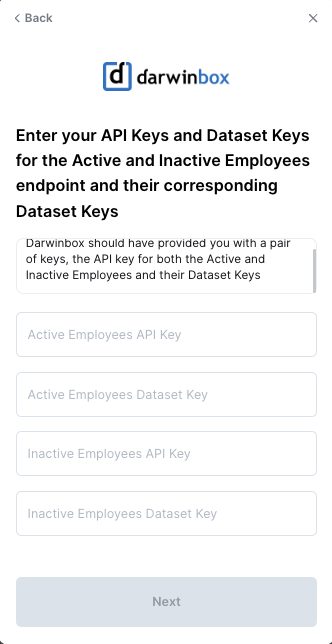
- An API key and dataset key for all active employees
- An API key and dataset key for all inactive employees
Both datasets matter. Leavers are what let Mesh spot accounts that outlived their owner's employment, so requesting only the active dataset limits what the connector can tell you.
These steps reflect Axiad's current understanding of Darwinbox's configuration. Because Darwinbox is a third-party product, there may be variations between your experience and what this guide describes, depending on the version in use and recent updates.
If you find a significant difference, or anything that doesn't make sense, let us know through Axiad support.
Step 2 — Ask for the fields to be enabled
Darwinbox exposes fields on its master API selectively, so ask your representative to enable the ones the connector reads. For identity correlation and risk assessment, the useful groups are:
| Group | Fields |
|---|---|
| Identity | employee_id, first_name, last_name, full_name, company_email_id |
| Employment | employee_status, employee_type, date_of_joining, date_of_activation, date_of_exit |
| Organization | department_name, department_code, designation_name, business_unit, group_company |
| Reporting | direct_manager_employee_id |
| Location | office_location, base_office_location, location_type |
| Change tracking | latest_modified_timestamp |
Personal fields such as home address, date of birth, marital status, and personal contact details can also be enabled, but Mesh does not need them for identity work. Enable only what you're comfortable sharing.
Step 3 — Connect in Mesh
Follow Connect your HR system, choose Darwinbox in the connection window, and supply the credentials and dataset keys from Step 1.
After connecting
The connector appears in your connectors list with Health: Initializing while the first collection runs, then moves to Good. Access is read-only: Mesh does not write back to Darwinbox.
If it doesn't come online, see Troubleshoot HR connectors.
Troubleshooting
| What you see | Likely cause | Fix |
|---|---|---|
| Only current employees arrive | Only the active-employee dataset key was issued | Ask your Darwinbox representative for the inactive dataset key as well |
| Expected fields are empty | Those fields are not enabled on the master API | Ask your representative to enable them, then re-run the collection |
| Authentication fails | The dataset key and credentials are from different requests | Confirm both with your representative and reconnect |