Employment Hero setup
Employment Hero connects through the unified HRIS connector. Unlike most providers, there is nothing to create in advance: you authorize the connection by signing in during setup.
Before you start
- Administrator access to your company's Employment Hero instance.
- An Employment Hero plan on Platinum or higher. API access is not available on lower plans, so the connection cannot be completed without it.
If your plan is below Platinum, the authorization will not succeed. Confirm with your Employment Hero account team before starting.
These steps reflect Axiad's current understanding of Employment Hero's configuration. Because Employment Hero is a third-party product, there may be variations between your experience and what this guide describes, depending on the version in use and recent updates.
If you find a significant difference, or anything that doesn't make sense, let us know through Axiad support.
Step 1 — Sign in to Employment Hero
Follow Connect your HR system and choose Employment Hero. The connection window redirects you to Employment Hero — sign in with your own credentials.

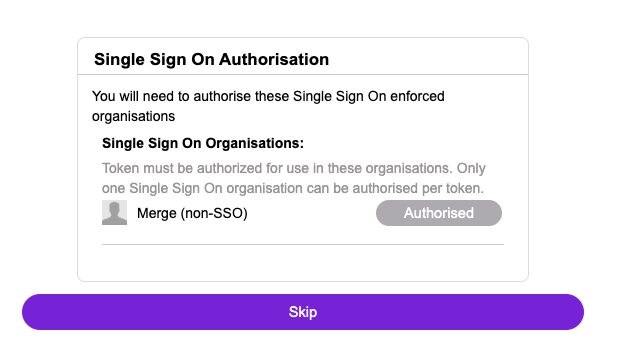
Step 2 — Authorize the single sign-on organization
You may be asked to authorize a single sign-on organization. If you have not set one up, or have already authorized it, select Skip.
Step 3 — Review and accept permissions
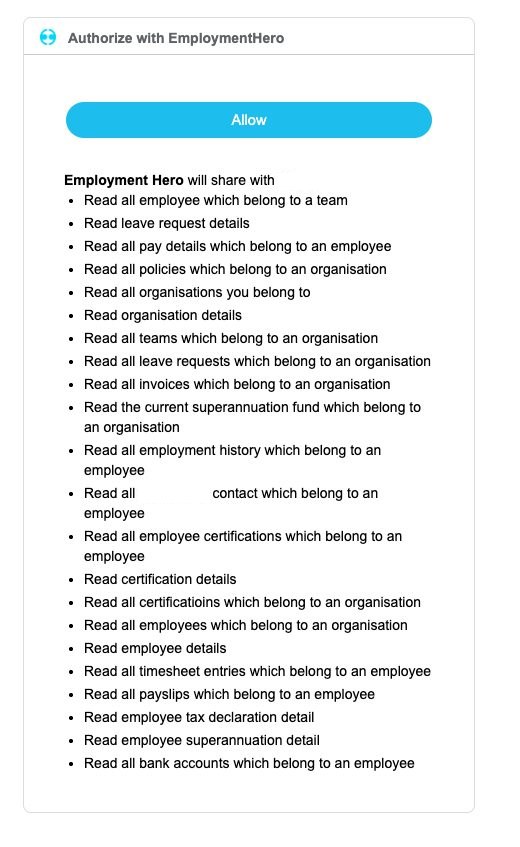
Review the access being requested and select Allow. The exact permissions vary depending on how Employment Hero is configured for your organization.
After connecting
The connector appears in your connectors list with Health: Initializing while the first collection runs, then moves to Good. Access is read-only: Mesh does not write back to Employment Hero.
If it doesn't come online, see Troubleshoot HR connectors.
Troubleshooting
| What you see | Likely cause | Fix |
|---|---|---|
| Authorization fails or the API is unavailable | The Employment Hero plan is below Platinum | Contact your Employment Hero account team about plan requirements |
| The sign-on step loops | The single sign-on organization was neither authorized nor skipped | Retry and select Skip if you have no SSO organization |
| Permissions look different from this guide | Employment Hero varies them by configuration | Accept the permissions shown, provided they are read access |