Universal REST connector
Not every system in your environment has a dedicated Mesh connector — and you shouldn't have to wait for one to get its identity data into Mesh. The universal REST connector lets you integrate any system that exposes a REST API, using a template that describes how Mesh should talk to it.
How it works
The universal REST connector is template-driven. A template describes your system's API to Mesh:
- Endpoints — where to fetch users, groups, machine accounts, credentials, and other identity data.
- Authentication — how Mesh authenticates to the API, with secrets stored write-only like any other connector credential.
- Pagination — how to walk through large result sets.
Once configured, the connector behaves like any other source: it collects on a schedule, and the data is normalized into Mesh, correlated into identities, and scored for risk exactly as data from a dedicated connector would be.
Setup is guided: a conversational flow walks you through the application name, the base URL, the OpenAPI or Swagger specification, and the authentication scheme, then validates the specification and helps you select which data to collect. See AI features and data handling for how the guided setup handles your data.
What each endpoint contributes
Setup asks you to confirm which endpoints the connector collects, and what each one returns. That choice is what decides where the records land in Mesh, so it's worth getting right:
| Ingest category | Use it for |
|---|---|
user | People — employee, contractor, and guest accounts |
group | Groups, teams, or roles that accounts belong to |
nhi | Non-human identities — service accounts, bots, workload identities, and other machine accounts |
credential | Secrets and keys — API keys, tokens, and certificates |
entitlement | Permissions or grants held by an account |
no category | Leave this endpoint out of the connector |
Mesh suggests a category for each endpoint by reading your API's own specification — its paths, its names, and the shape of what it returns. Suggestions are inferences and can be wrong, so confirm each one before continuing.
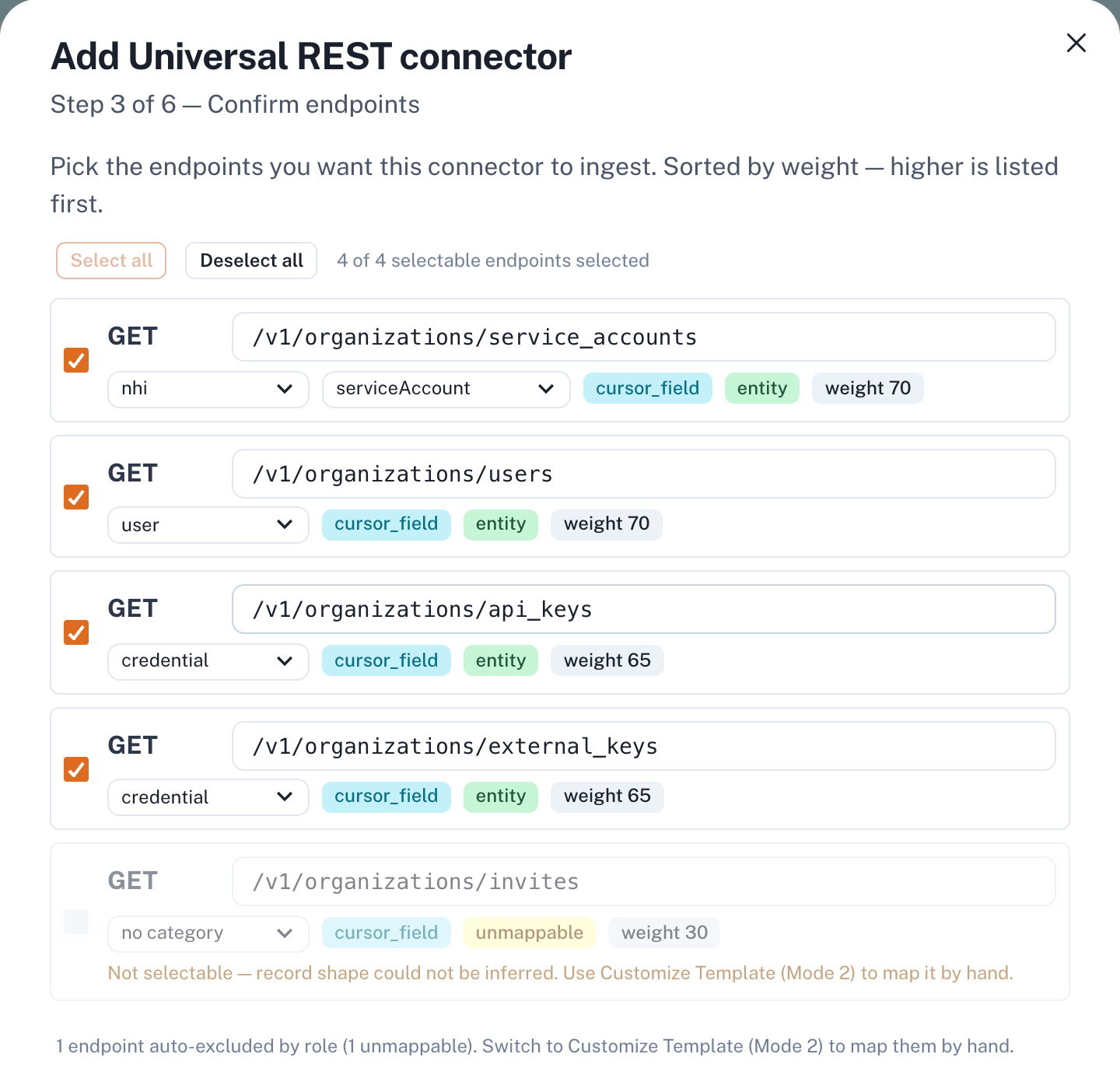
Two labels appear against each endpoint:
- Weight orders the list — higher is listed first. It reflects how strongly the specification suggests the endpoint holds identity data, and it only affects the ordering, never what the connector collects.
cursor_fieldmeans the specification describes cursor-based paging. Mesh follows that cursor through to the end of the collection, however many pages it runs to.
An endpoint marked unmappable could not have its record shape inferred from the specification. It cannot be selected here; map it by hand through Customize Template instead.
Machine identities
Set an endpoint to nhi and Mesh asks a second question: what kind of machine
identity does it return? The kind is what places the account correctly on the
non-human identity screens and in the agentic AI inventory.
| Kind | Use it for |
|---|---|
serviceAccount | A general-purpose account used by an application rather than a person |
servicePrincipal | An application's own identity in a directory |
managedIdentity | An identity a cloud platform issues and rotates for you |
workloadIdentity | An identity attached to a running workload, such as a pod or a job |
oauthApp | A registered application granted access on someone's behalf |
cicdRunner | A build or deployment agent |
rpaBot | A robotic process automation bot |
aiAgent | An AI agent acting on its own credentials |
device | A device enrolled as an account in its own right |
If a single endpoint returns a mix — service accounts and bots from the same list, for example — choose kind from API response instead. Mesh then reads the kind from a field in each record rather than applying one kind to everything the endpoint returns.
Credentials and their owners
Every credential Mesh collects is attributed to an owner, and that owner can be a machine. An API key issued to a service account is attributed to that service account, and appears against it on the machine identity's own screens.
Two things follow. Machine accounts are counted as machine accounts rather than as people, so your human identity figures and per-person risk reflect people only. And a key held by a machine has a named owner, so it can be reviewed like any credential a person holds.
A connector keeps the endpoint mapping it was created with, and goes on collecting under that mapping until you remove it. To change what an endpoint contributes, set the connector up again against the same API.
When to use it
| Your situation | Best fit |
|---|---|
| The system has a dedicated connector in the integration catalog | Use the dedicated connector — it's purpose-built for that system's data model |
| The system has a REST API but no dedicated connector | Use the universal REST connector |
| The system has a REST API but is only reachable inside your network | Combine approaches: run the connector through the edge agent |
| The system can't be reached over an API at all | Use a custom or offline import — see the Custom & Offline section of this documentation |
If you're unsure which path fits, contact Axiad Customer Success — a dedicated connector for your system may already be planned. New connectors are announced in the release notes.
Authoring a template
Templates describe the specifics of your system — its endpoints, its authentication scheme, and how its records map onto Mesh's data model. Work with Axiad to author the template for your system: contact Axiad Customer Success with your system's API documentation, and Axiad helps you build and validate the template.
A worked example
Example: Axiad Conductor walks through a complete setup end to end — including how Mesh handles an API that returns records nested inside other records, and what a first sync looks like on a large tenant.
What to expect after setup
- The connector appears on the Connectors page alongside your other connectors, with the same health reporting.
- Collected accounts are correlated to identities and contribute to risk scores like data from any other source.
- Credentials follow the same rules as other connectors — see Manage connector credentials.