Run the edge agent
This guide is for whoever runs the Axiad edge agent on a machine inside your network — usually someone on the IT or infrastructure team. Your Mesh administrator sends you two things: a one-time enrollment token and a command to run. This page walks you through running that command and confirming the agent connected.
If you manage connectors from the Mesh dashboard instead, see Set up an on-prem connector.
What the edge agent is
The edge agent is a small program that runs as a container on a machine inside your network. It lets Mesh reach internal systems that aren't exposed to the internet.
The agent only ever connects out to Mesh over HTTPS, and keeps that secure connection open. It never accepts incoming connections — so you don't need to open any firewall ports for it.
Before you begin
Here's what you need to have ready:
- A Linux machine inside your network with Docker installed and running (Step 1 shows how to check). Another container runtime such as Podman works too.
- Outbound HTTPS (port 443) from that machine to Mesh. No inbound ports.
- A network path from that machine to the internal systems you want Mesh to collect from.
- From your Mesh administrator: your one-time enrollment token and the command to run.
The enrollment token is valid for 15 minutes and works only once.
The 15 minutes starts when your administrator creates the token, not when it reaches you. So if it came to you after a delay — an email that sat for a while, or a handoff between people — you may have less time left, or none. Run the command as soon as you get the token, and if you're not sure how long ago it was created, just ask for a fresh one.
If the token expires first, enrollment fails with enroll: ENROLL_TOKEN expired. Ask your
administrator to register the agent again and send a new token — there's nothing to clean
up first, and it doesn't matter that an earlier try failed.
Step 1 — Check that Docker is installed and running
The agent runs as a Docker container, so first make sure Docker is installed and running. Open a terminal on the machine and follow along.
Check that Docker is installed:
docker --version
You should see a version string, for example Docker version 27.3.1, build ce12230. If
you get command not found, install Docker first — see
Install Docker Engine — then come back here.
Start Docker and confirm it's running:
sudo systemctl start docker
docker info
docker info prints the server details when Docker is running. If you instead see
Cannot connect to the Docker daemon at unix:///var/run/docker.sock. Is the docker daemon running?, Docker isn't started yet — run the systemctl start line above and try
again.
The agent should come back on its own after a reboot, so set Docker to start automatically:
sudo systemctl enable docker
systemctl only exists on systemd Linux hosts. With Docker Desktop (macOS or
Windows), start it from your terminal instead:
docker desktop start
Or open the Docker Desktop app and wait until it says the engine is running. Either way,
docker info is the check — if it succeeds, you're ready for Step 2.
The agent image needs nothing Docker-specific — any standard container runtime that can pull an image and run a container with a mounted volume works.
- Podman — mostly a drop-in replacement (
podman runtakes the same flags asdocker runhere). One thing to watch: in Podman's default rootless mode, you may need one extra one-time step to give the agent write access to its storage before the first start. - containerd (via its
nerdctltool) — behaves like Docker directly, without Podman's rootless difference. - Kubernetes — if you already run Kubernetes, you can deploy the agent as a normal workload there instead of a standalone container. The storage-permission step still applies, just handled the usual Kubernetes way on the volume.
Step 2 — Run the agent
Your administrator copies the command from the Add on-prem agent dialog in Mesh and sends it to you along with the token. Here's what they see:
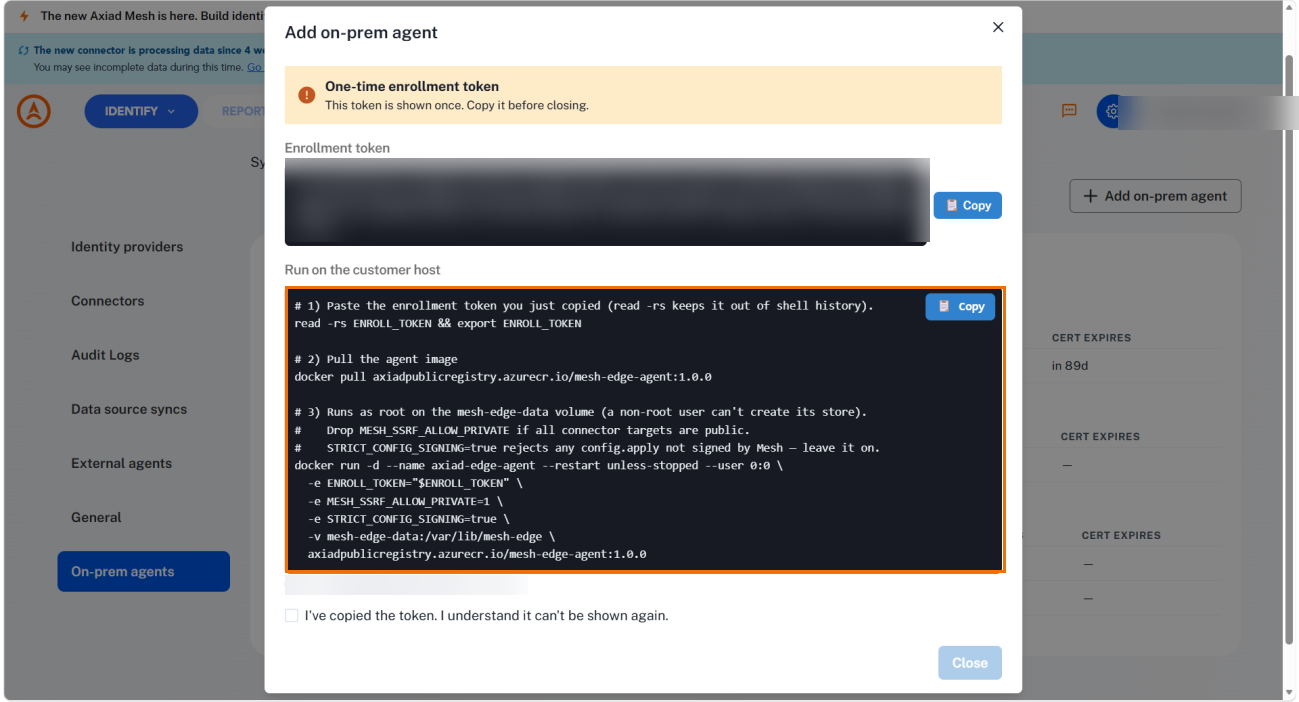
The command has three parts — one takes your token, one downloads the agent, one runs it:
# 1) Paste your enrollment token. (read -rs keeps it out of your command history.)
read -rs ENROLL_TOKEN && export ENROLL_TOKEN
echo "${#ENROLL_TOKEN}"    # Prints the token's length — make sure it's NOT zero. Nothing
                           # shows on screen as you paste, so this is your only check.

# 2) Download the agent image. 1.0.0 is an example — use the version the dialog shows you.
docker pull axiadpublicregistry.azurecr.io/mesh-edge-agent:1.0.0

# 3) Run the agent.
docker run -d --name axiad-edge-agent --restart unless-stopped --user 0:0 \
  -e ENROLL_TOKEN="$ENROLL_TOKEN" \
  -e MESH_SSRF_ALLOW_PRIVATE=1 \
  -e STRICT_CONFIG_SIGNING=true \
  -v mesh-edge-data:/var/lib/mesh-edge \
  axiadpublicregistry.azurecr.io/mesh-edge-agent:1.0.0
Run the first line on its own. The terminal waits quietly — paste your token and press
Enter. Nothing appears on screen (that's on purpose, so your token doesn't end up in your
command history). The echo line then prints the token's length; check that it isn't
zero, which is your one sign the paste actually worked.
Your token is held in a variable that only exists in the terminal window where you pasted
it. If you open a new window, switch users (for example sudo -i), or reconnect over SSH
before you run the agent, that variable is empty again — and Docker won't warn you.
The agent starts and then fails with a confusing config: gateway address unknown.
So paste the token and run the agent in the same window. If some time has passed,
run echo "${#ENROLL_TOKEN}" again and check it's still not zero before you continue.
If you accidentally copied an extra line break or a trailing space with the token, enrollment fails with a confusing error — and nothing on screen tells you the paste was messy. To check for a stray line break:
printf '%s' "$ENROLL_TOKEN" | wc -l
This should print 0. If it prints 1 or more, copy the token again and re-paste it.
What the parts mean:
| Part | What it does |
|---|---|
ENROLL_TOKEN | Your one-time token, from the first command. The agent uses it once to join Mesh, then remembers its own identity — so you won't need it again. The token also tells the agent where your Mesh environment is, so there's nothing else to point it at (no need to set MESH_GATEWAY). |
MESH_SSRF_ALLOW_PRIVATE=1 | Lets the agent reach systems on your private network. Keep it if any of your targets are internal (the usual case); drop it only if every target is on the public internet. |
-v mesh-edge-data:/var/lib/mesh-edge | Where the agent stores its identity and state. Docker creates this on first run — nothing to set up — and it survives restarts and upgrades. |
--user 0:0 | Runs the agent as root so it can create its storage on first start. |
--restart unless-stopped | Starts the agent again automatically after a reboot. |
STRICT_CONFIG_SIGNING=true | Tells the agent to accept only connector settings that Mesh has signed. On by default — leave it on. |
The command above keeps the agent's data in a Docker volume called mesh-edge-data.
That's the recommended default — Docker creates it for you, and with --user 0:0 there's
nothing to prepare.
If you'd rather store the data in a folder on the host machine, swap the -v for a
host path, for example -v /var/lib/axiad-edge:/var/lib/mesh-edge. Only the left side
changes; the right side stays /var/lib/mesh-edge. One catch: the folder has to exist
and be writable by the agent before you start it, or the agent stops right away with
mkdir .../store: permission denied.
Which user needs access depends on how you run the agent:
# If you keep --user 0:0, the agent runs as root — just create the folder:
sudo mkdir -p /var/lib/axiad-edge

# If you remove --user 0:0, the agent runs as its own user (ID 65532). Create the
# folder AND give that user access:
sudo mkdir -p /var/lib/axiad-edge
sudo chown 65532:65532 /var/lib/axiad-edge
When you pass the token with -e, it appears on the command line — which means it's
saved in your command history and visible in the machine's process list. To avoid that,
put the settings in a file and use --env-file instead:
cat > ~/mesh-edge.env <<'EOF'
ENROLL_TOKEN=paste-your-token-here
MESH_SSRF_ALLOW_PRIVATE=1
STRICT_CONFIG_SIGNING=true
EOF

docker run -d --name axiad-edge-agent --restart unless-stopped --user 0:0 \
  --env-file ~/mesh-edge.env \
  -v mesh-edge-data:/var/lib/mesh-edge \
  axiadpublicregistry.azurecr.io/mesh-edge-agent:1.0.0
Don't put quotes around the values — ENROLL_TOKEN="abc" treats the quotes as part of
the token. Delete the file once the agent has joined.
Step 3 — Verify it enrolled and connected
Watch the agent's logs to confirm it joined Mesh and connected:
docker logs -f axiad-edge-agent
The agent prints its logs as JSON. Look for these messages, in order:
enroll: success— the agent registered with Mesh.agent.connect ok— the secure connection to Mesh is up. This line also shows which gateway it reached, for examplegateway=edge.example.axiad.io:443.heartbeat: initial tick sent— the agent has checked in and is healthy.
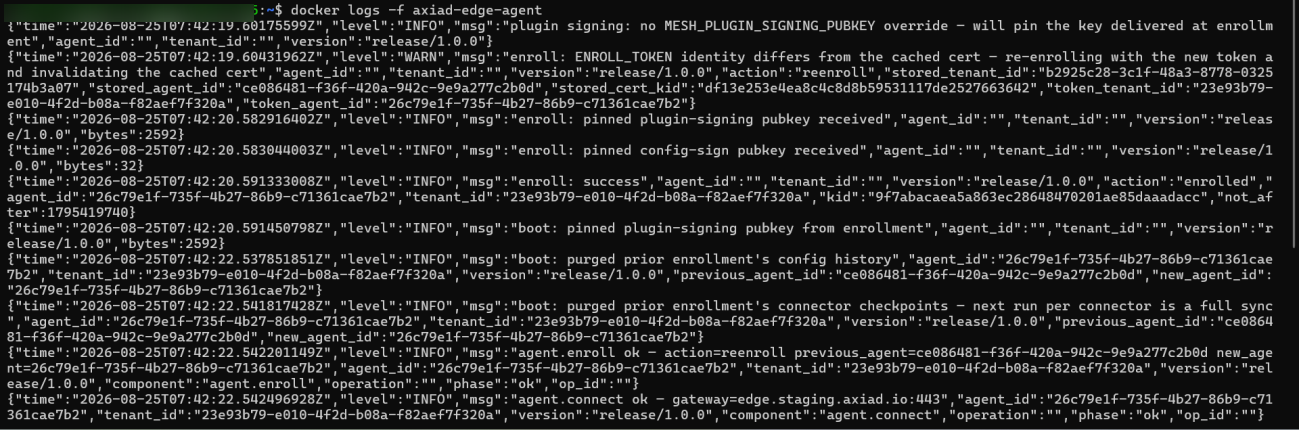
If this machine ran an agent before, you might see
enroll: ENROLL_TOKEN identity differs from the cached cert. That's fine — the agent
simply re-joins with your new token and drops the old identity. Nothing for you to do.
You can also ask the agent for its status directly:
docker exec axiad-edge-agent agent status
- Joined:
agent kid=... issued_at=... not_after=.... Thenot_aftervalue is when its certificate expires — it renews on its own. - Not joined yet:
agent: not enrolled.
docker exec only works while the container is actually running — which is exactly when
a struggling agent won't be, since it spends its time restarting. When that happens, you
can read the same status from a quick throwaway container that looks at the same stored
data. It needs no token and nothing else running — just reuse the same -v from your run
command:
# Use the tag you actually ran (1.0.0 is an example).
docker run --rm --user 0:0 -v mesh-edge-data:/var/lib/mesh-edge \
  axiadpublicregistry.azurecr.io/mesh-edge-agent:1.0.0 status
This is the quickest way to check the agent's identity, certificate expiry, and last
crash reason (the last_crash= line) when the container won't stay up. You can also run
docker logs axiad-edge-agent on a stopped (but not removed) container to read its
recent logs — no running process required.
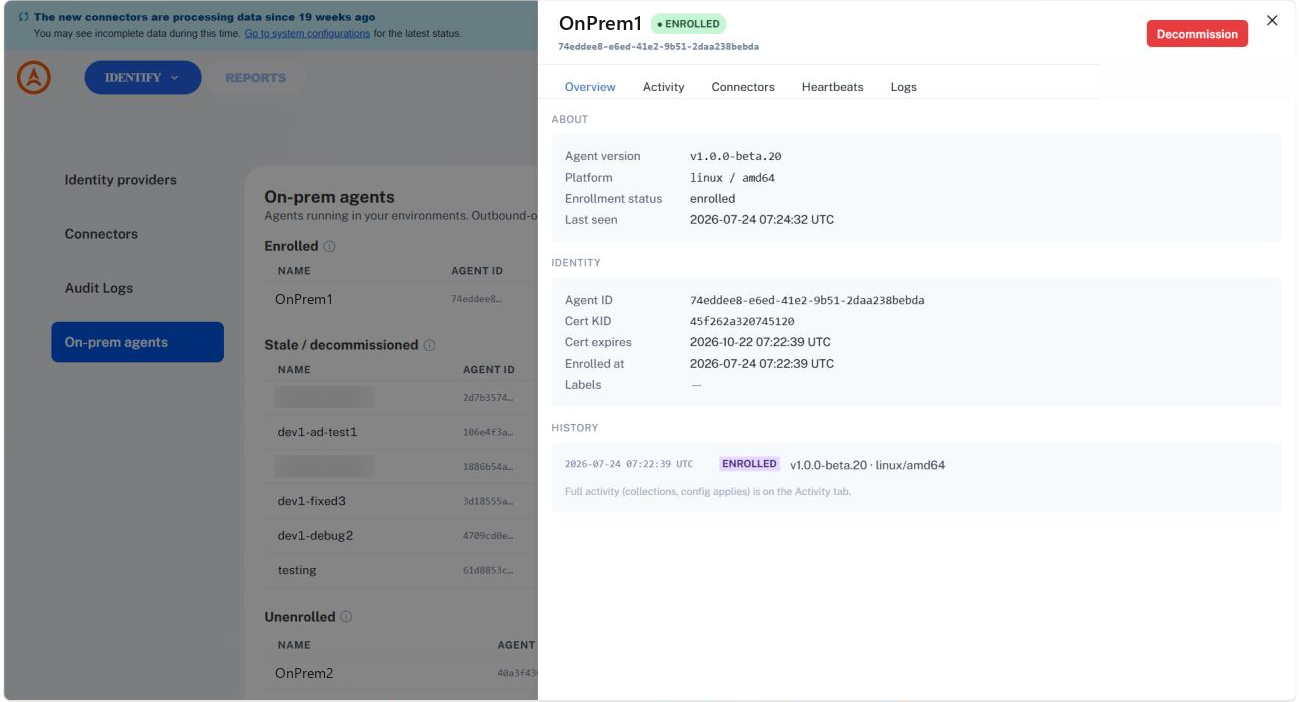
Once the agent is connected, let your administrator know. On their side it shows as Enrolled, and its Overview tab shows the version and platform you're running:
Keeping it running
-
Restart it:
docker restart axiad-edge-agent. The agent reuses its stored identity and reconnects — no new token needed. Heads up: a restart keeps the same settings the container started with. It won't pick up a new token or any changed-e/--env-filevalue, because a container's settings are fixed when you first run it. To change a setting — for example to fix a bad token — you have to recreate the container, not restart it: rundocker rm -f axiad-edge-agent, thendocker runagain. (This is why a corrected token sometimes seems to "not take effect" — a plain restart ignored it.) -
Stop it:
docker stop axiad-edge-agent. It shuts down cleanly (boot: shutdown complete) and stays down until you start it again. -
After a reboot: thanks to
--restart unless-stopped, the agent starts on its own — as long as Docker starts with the machine (Step 1). -
Certificate renewal: the agent's certificate lasts 90 days, and the agent renews it automatically about 7 days before it expires — over its existing connection, with no new token and no restart. The only way this breaks is if the agent stays completely offline for the full 90 days; then the certificate lapses and your administrator issues a new enrollment token.
-
Upgrade to a new version: there's no automatic update. To move to a newer version, download the new tag and recreate the container (
1.1.0here is an example — use the version you're upgrading to).Write down your exact settings first — you can't recover them afterdocker rmWhatever flags the running container actually has — a custom
--user, an extra-e, a host-directory mount instead of the named volume — only exist in that container's own config. Once it's removed, they're gone for good; there's no way to get them back from Docker afterward. Before you remove anything, check what's actually running, not just what this guide's example command shows:# Storage — confirm the exact volume (or host path) and where it's mounted. If this
# doesn't match -v mesh-edge-data:/var/lib/mesh-edge, use what's shown here instead
# of the guide's example when you recreate the container.
docker inspect axiad-edge-agent --format '{{range .Mounts}}{{.Type}} {{.Name}}{{.Source}} -> {{.Destination}}{{"\n"}}{{end}}'
# User — if the value in quotes is not empty, pass the same --user
# value when you recreate the container. Otherwise it can fail to start with
# `permission denied` on its own storage (see Troubleshooting below) — a different
# problem than the first-run host-directory case earlier in this guide.
docker inspect axiad-edge-agent --format 'User: "{{.Config.User}}"'
# Env var names in use (values aren't shown here on purpose, so a token doesn't end
# up in your terminal scrollback or history).
docker inspect axiad-edge-agent --format '{{range .Config.Env}}{{.}}{{"\n"}}{{end}}' | cut -d= -f1docker pull axiadpublicregistry.azurecr.io/mesh-edge-agent:1.1.0
# Rename rather than remove — it costs nothing, and it means undoing a bad upgrade is
# a single `docker rename` + `docker start` away instead of rebuilding the container
# from memory. Once you've confirmed the new one is healthy, remove this old one.
docker stop axiad-edge-agent
docker rename axiad-edge-agent axiad-edge-agent-previous
docker run -d --name axiad-edge-agent --restart unless-stopped --user 0:0 \
-e ENROLL_TOKEN="" \
-e MESH_SSRF_ALLOW_PRIVATE=1 \
-e STRICT_CONFIG_SIGNING=true \
-v mesh-edge-data:/var/lib/mesh-edge \
axiadpublicregistry.azurecr.io/mesh-edge-agent:1.1.0Your
mesh-edge-datastorage (or whatever you captured above, if it's different) keeps the agent's identity through the upgrade, so you don't need a new token — you can leaveENROLL_TOKENempty. Confirm the new container is healthy the same way as Step 3 —agent.connect ok, a heartbeat, and nopermission deniedlines — then clean up the old one:docker rm axiad-edge-agent-previousIf the new container fails to start or keeps restarting instead, roll back:
docker rm -f axiad-edge-agent
docker rename axiad-edge-agent-previous axiad-edge-agent
docker start axiad-edge-agent
Your administrator can see the running version on the agent's Overview tab in Mesh.
-
Remove it: if your administrator decommissions the agent in Mesh, it shuts down and won't reconnect. To retire the machine yourself, remove the container and its stored data:
docker rm -f axiad-edge-agent
docker volume rm mesh-edge-data
Behind a proxy
If this machine reaches the internet through an HTTP proxy, tell the container about it
the usual Docker way — add -e HTTPS_PROXY=http://proxy.example.com:8080 to your
docker run command.
Troubleshooting
| Symptom | What to do |
|---|---|
Cannot connect to the Docker daemon at unix:///var/run/docker.sock | Docker isn't running. Start it with sudo systemctl start docker (or start Docker Desktop), then redo Step 1. |
Logs show enroll: ENROLL_TOKEN expired | The token ran out before the agent joined, and can't be reused. Ask your administrator to register the agent again, then run the command with the new token. |
Logs show enroll: ENROLL_TOKEN required... | The token never reached the container. Check that -e ENROLL_TOKEN="$ENROLL_TOKEN" is in your command. |
Logs show config: ENROLL_TOKEN is set but empty | The token variable is there but empty — usually a paste that didn't land, or a new terminal window where it was lost. Redo the read -rs ENROLL_TOKEN && export ENROLL_TOKEN step from Step 2, use the "Double-check the paste" check, and run the agent again. |
Logs show config: gateway address unknown | The token was missing or empty, so the agent couldn't find your Mesh address inside it. Check the token landed with echo "${#ENROLL_TOKEN}" (should not be zero) and re-paste it in the same terminal window. You don't need to set MESH_GATEWAY — the address comes from the token. |
| The token looks set, but the agent still says it's missing or empty | Either it was lost when you switched terminal windows (re-paste it in the same one), or you changed the token and only restarted the container. A restart keeps the old settings — recreate it instead: docker rm -f axiad-edge-agent, then docker run again with the correct token. |
Logs show MESH_GATEWAY="..." overrides the enrollment token's gateway "..." and the agent won't start | Something set MESH_GATEWAY to a different address than the one in your token. The agent refuses to join one Mesh environment and connect to another. Remove the MESH_GATEWAY setting and let the token decide, or ask your administrator for a token for the environment you meant to use. |
Logs show certificate signed by unknown authority | The agent connected to the wrong Mesh environment — easy to do by pointing at the wrong address. Double-check any MESH_GATEWAY setting, and make sure you copied the command from the right environment. |
docker exec axiad-edge-agent agent status says Container ... is restarting or ... is not running | docker exec only works while the container is up. Use the throwaway-container trick under Step 3 to read status, and check docker logs axiad-edge-agent for the last error. |
After an upgrade, logs show mkdir .../store/...: permission denied and the container keeps restarting | The recreated container is missing a --user setting the original had. This is different from the first-run host-directory case earlier in this guide — it happens when the storage was created under a non-default user (commonly --user 0:0) and the new docker run left that flag out, so the container falls back to the image's own nonroot user instead. Check what the previous container actually used — docker inspect <name> --format '{{.Config.User}}' works even on a stopped container you haven't removed yet — and pass the same --user value when you recreate it. See Upgrade to a new version for capturing this before you remove anything. |
You never see agent.connect ok | The machine can't reach Mesh on port 443. Check your outbound firewall and DNS. |
| Your administrator sees the agent as Enrolled but Stale in Mesh | Joining Mesh and staying connected are two separate steps — the agent can join successfully but then fail to keep its connection open. Check the logs for agent.connect ok; if it's not there, it's the same port-443 problem as the row above. |
| A connector test can't reach an internal system | Make sure the machine can reach that system, and that MESH_SSRF_ALLOW_PRIVATE=1 is set. |
Need more detail while troubleshooting? Add -e MESH_LOG_LEVEL=debug to your
docker run command for more verbose logs.
Verify
You're done when:
docker infosucceeds — Docker is installed and running.docker logsshowsenroll: successandagent.connect ok.docker exec axiad-edge-agent agent statusshowsagent kid=....- Your administrator sees the agent as Enrolled in Mesh.