Troubleshoot a sync
Start from the Status column and work down to the row detail.
A failed run
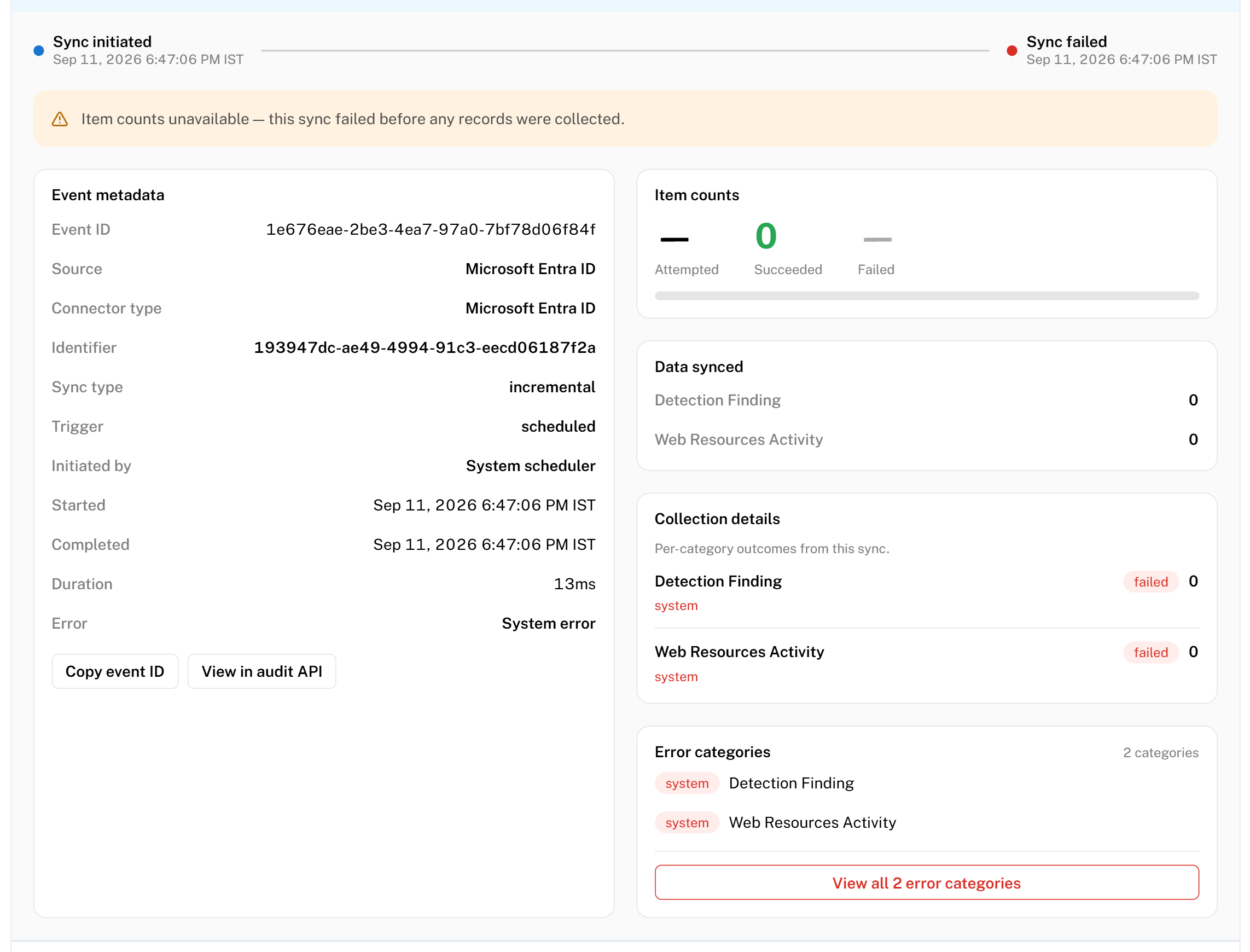
A failed run collected nothing. Mesh classifies why into one of five reasons.
| Reason shown | What it means | What to do |
|---|---|---|
| Authentication failed | The credential was rejected | Check the credential has not expired or been revoked, then re-enter it |
| Authorization denied | The credential was accepted, but is not allowed to read what Mesh asked for | Check the permissions on the account or token in the source system |
| Connection or network error | Mesh could not reach the source | Check the URL, and whether the source restricts access by IP address |
| Configuration error | A setting on the connector is wrong or incomplete | Open the connector and re-check its configuration |
| System error | Something failed inside the collection itself | Re-run it. If it repeats, contact Axiad support with the Sync ID |
Authentication and authorization failures are the most common, and both are fixed in the source system rather than in Mesh. A credential that worked for months and suddenly stops has usually expired, been rotated, or had its permissions narrowed.
Steps
- Open the failed row.
- Read the reason.
- Apply the fix above.
- Select Run now on the connector to test it, rather than waiting for the next scheduled run.
- Confirm the new row shows Success.
A partial run
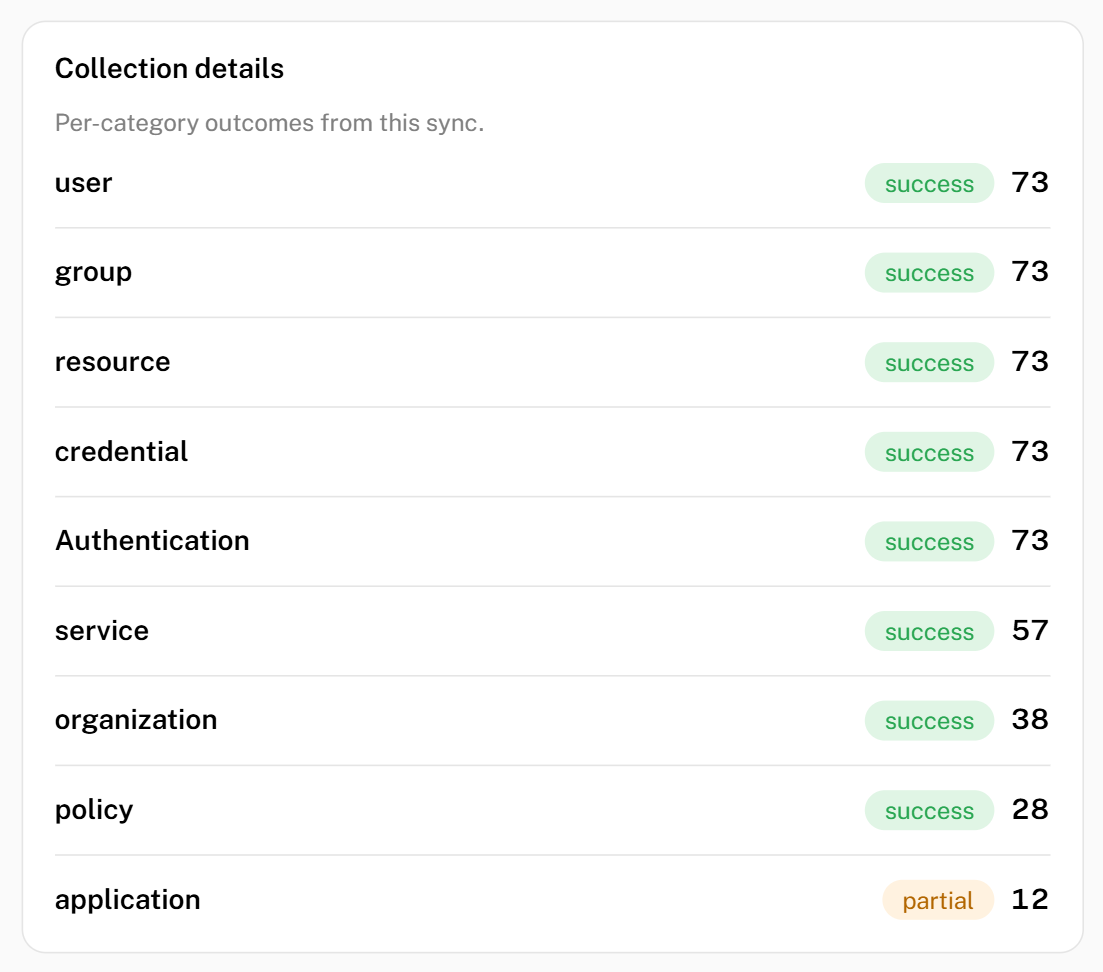
A partial run collected some of your data and not the rest. This is not the same as a failure — what arrived is in Mesh and is usable.
Steps
- Open the row.
- Under Data synced, compare the categories that arrived with those that did not.
- Read the failure detail for the categories that did not.
- Fix the cause using the table above — a partial run usually means the credential can read some kinds of data but not others, which is Authorization denied for that category.
- Re-run and confirm.
A connector that is partial on every run is not collecting a whole category of data. Anything Mesh derives from that category is incomplete for as long as it continues.
A run that never finishes
A row can stay In progress for two reasons.
| How long | What it means | What to do |
|---|---|---|
| Under 24 hours | The run is still going. Large first collections take a while. | Wait |
| Over 24 hours | The row is marked Interrupted — the run never reported how it ended | Re-run it |
An Interrupted row almost always means the service restarted mid-run. Data collected before that point was kept, so re-running is safe.
Steps
- Confirm the row reads Interrupted, not In progress.
- Select Run now on the connector.
- Confirm a new row appears and completes.
If runs are repeatedly interrupted, contact Axiad support.
A run I already fixed still shows Failed
That is expected. The row records what happened when that run ran, and Mesh never goes back and changes it.
- Fix the cause.
- Select Run now on the connector.
- Read the new row. The older rows keep their original status.
If the new row still fails, work through A failed run again.
The counts look wrong
| What you see | What it means |
|---|---|
| A dash instead of a number | That connector does not report that number. It is not a zero — see A dash is not a zero |
| Low Items on an incremental run | Expected. An incremental run collects only what changed |
0 items and Success | The run worked and there was nothing new to collect |
| Attempted higher than Succeeded | The difference is the Failed count. Open the row for the detail |
Contact Axiad
If a run keeps failing after you have applied the fix, raise it with Axiad — through your account team or the support contact in your agreement. See Contacting Axiad.
Include:
| Include | Where to find it |
|---|---|
| The Sync ID | The row on this screen |
| The Time of the run, including the time zone shown next to it | The row on this screen |
| The connector name | The Source column |
| The reason shown | The expanded failed row |
The Sync ID is the fastest way to find the exact run, so include it even if you have the time and connector name.