Audit logging
Axiad Mesh keeps an audit log of administrative and security-relevant activity in your tenant. Use it to answer who did what, and when — for compliance reporting, access reviews, and troubleshooting.
Where to find audit logs
In the Mesh dashboard, go to Settings → Config Management → Audit Logs.
The Audit Logs page shows audit records in a table you can review on screen and export to CSV.
What Mesh audits
The list below is a set of documented examples, not a complete catalog of every event type Mesh records. New event types are announced in the release notes as they ship.
- Sign-ins. Successful sign-in entries include a Role column showing
the role — admin or user — granted at sign-in. Entries where a role doesn't
apply, such as non-login events, show
-. Sessions from users with different roles display correctly in the same view. - Configuration changes. Changes to integration settings — for example, ServiceNow connection details — are recorded with who made the change and when.
- Asset exports. The audit log captures the full lifecycle of every asset export: both the start of the export and its final outcome, success or failure. The entries for one export share the same transaction ID, so you can trace it from start to finish.
- Data source synchronizations. Every connector synchronization is audited, for all connector types and for both scheduled and manual runs. These records also have their own view — see Data source synchronizations.
- AI assistant interactions. Interactions with the Mesh AI assistant are recorded in the audit log.
- First-run setup. On a new environment, first-run sign-ins and the creation of the first tenant are audited.
- Rejected cross-tenant attempts. When an onboarding operation or a tenant profile update is refused because the tenant it targeted doesn't match the signed-in session, the refusal is recorded. An attempt that was blocked leaves a trace in the audit log rather than appearing only in access logs.
- On-prem agent and connector activity. Agents registering and being decommissioned, connector configuration changes, connection tests, and each collection run through an agent are all recorded in your audit log. Entries identify whether the actor was one of your users, the agent itself, or the system. See Set up an on-prem connector.
What a record contains
Depending on the event type, an audit record includes:
- Actor — who or what performed the action. This is usually one of your users: each asset export entry, for example, is attributed to the user who initiated the export. Some events are attributed instead to an on-prem agent or to the system, such as a scheduled collection run.
- Role — the role granted at sign-in, where applicable. Entries where a
role doesn't apply show
-. - Transaction ID — entries that belong to the same operation, such as the start and outcome of an asset export, share one transaction ID.
- Client IP address — recorded for asset exports triggered through the API.
- Time — when the event occurred.
How timestamps display
The Time column follows your tenant's timestamp display preference — Browser Timezone or UTC — which a tenant administrator sets on the tenant detail page in the admin area. The column header reflects the selected time zone, values render in the standardized timestamp format used across the product, and hovering over a timestamp shows the full value if the column is too narrow to display it.
Data source synchronizations
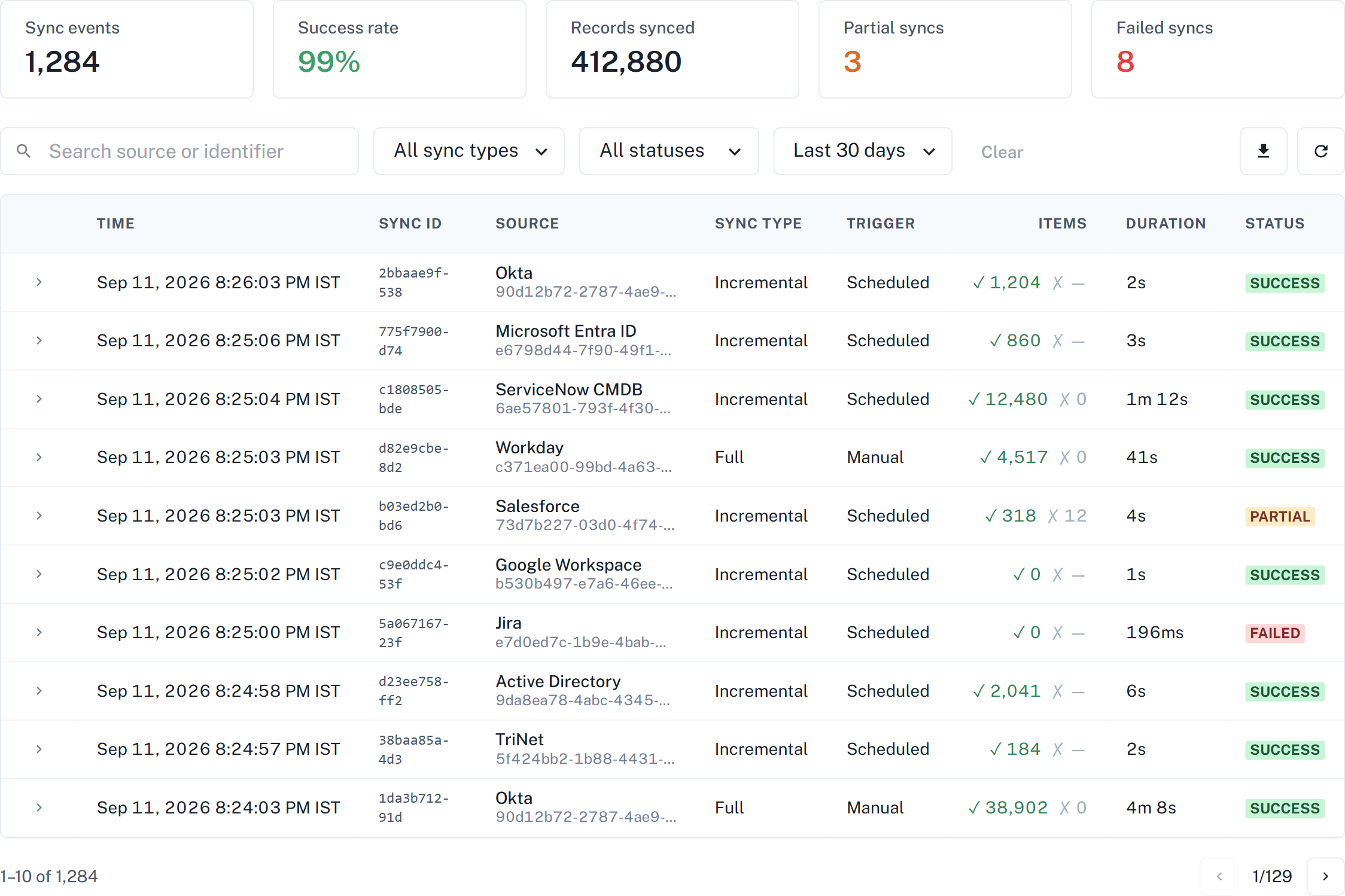
Connector synchronizations are audited like other activity, and they also have a dedicated view — Data source syncs — that presents one row per synchronization rather than separate start and finish entries.
Open Settings → Data source syncs.
Two screens, two questions
The connector list and this view answer different questions. Both are correct at the same time.
| Screen | Answers |
|---|---|
| Settings → Connectors | Is this connector healthy right now? |
| Settings → Data source syncs | What happened on each individual run? |
A connector can be healthy today and still have a failed run last week. The two screens showing different things is not a contradiction — they cover different time frames.
An outcome is recorded when the run happens
Each row stores the outcome that run had at the time it ran. Mesh never recalculates it later.
So a run that already finished keeps its original status, even after whatever caused it is fixed. Only runs that start after the fix reflect it. To confirm a fix, wait for the connector's next run and read the new row rather than the old ones.
Read more
- Data source syncs — what the screen is and where to find it.
- Read a sync result — the columns, the statuses, and what the item counts mean.
- Troubleshoot a sync — the failure reasons Mesh reports, and the fix for each.
Exporting audit logs
Select Export on the Audit Logs page to download the audit log as a CSV file.
- The export writes records to the file as they're retrieved, so downloads complete reliably even for wide date ranges and large datasets of more than 15,000 records.
- The Export button is disabled while an export is running, preventing accidental duplicate exports.
- Notifications show that an export is in progress and confirm completion with the number of logs exported.
- Records aren't duplicated across page boundaries in the exported file, and running several exports back to back works without errors.
Timestamps in exported CSV files are always in UTC, regardless of your tenant's timestamp display preference. This keeps exported data canonical for downstream processing.
Retention
This documentation doesn't state a fixed retention period for audit logs. Audit records are part of your Customer Data — extraction during the term of your agreement and retrieval after termination are governed by the Customer Data terms in your agreement. For the retention commitments that apply to your organization, refer to your agreement with Axiad or contact your Axiad representative.
SIEM integration
CSV export from the Audit Logs page is the supported way to move audit-log data into external tools today. Mesh doesn't currently document a streaming or API-based delivery mechanism for audit logs. If you need to feed audit logs into a security information and event management (SIEM) system, contact your Axiad representative to discuss your requirements.