Read the Connectors page
Settings > Connectors lists every connector in your tenant. For each one it answers two questions: can Mesh reach the source, and is data arriving?
This page describes the Connectors screen in the Generative UI dashboard. In the classic dashboard, connectors are under System configurations > Connectors.
Where to find it
- Select Settings.
- Select Connectors.
You need the Admin role. See Roles and access.
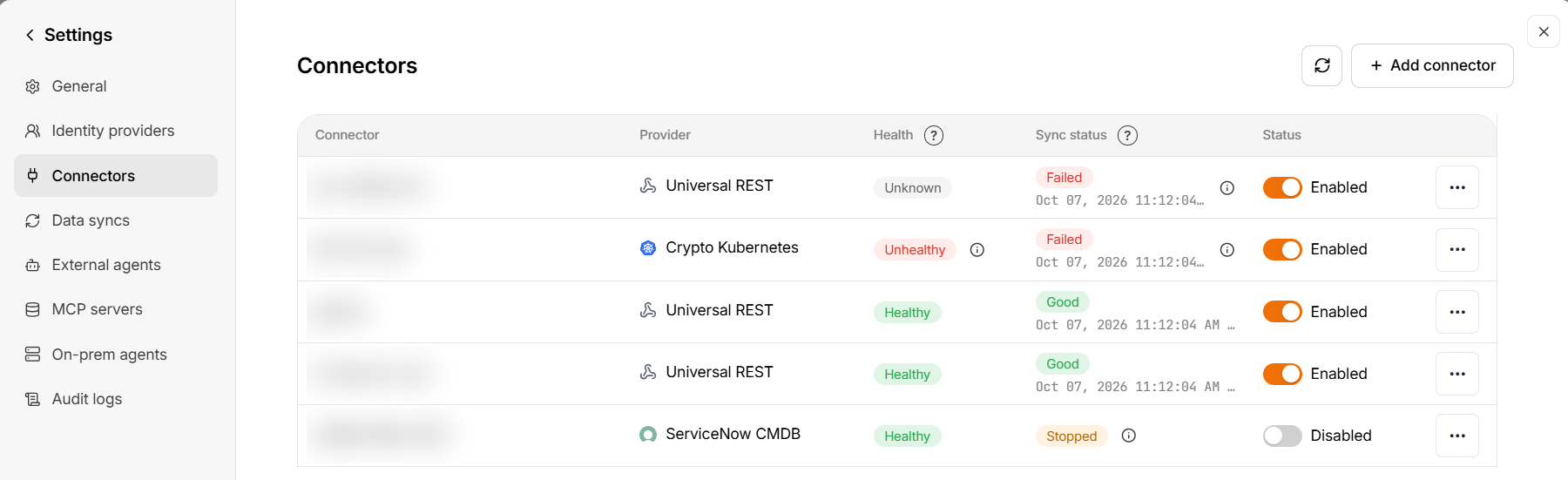
The table
| Column | What it shows |
|---|---|
| Connector | The name you gave the connector |
| Provider | The system it connects to. offline means a connector you feed by uploading files |
| Health | Whether Mesh can reach and sign in to the provider |
| Sync status | Whether data collection is working, with a time underneath |
| Status | Whether the connector is turned on |
| ⋯ | Actions for that connector |
- The page refreshes itself every minute. Select the refresh icon to update it now.
- Select ? next to a column heading to see what its values mean.
- Select ⓘ next to a status to see the reason behind it.
- Select a row to open its Collected data.
- Select Add connector to connect a new source.
- Times follow your tenant's timestamp display preference.
Health
Health is about the connection: can Mesh reach the provider and sign in?
| Health | Meaning | What to do |
|---|---|---|
| Healthy | The provider connection is available | Nothing |
| Unhealthy | The provider rejected a request, or could not be reached | Select ⓘ for the reason, then see Fix a connector |
| Unknown | Mesh cannot confirm the connection yet — common for a new connector, or when the latest sync failed for a reason other than the connection | Check Sync status and its reason |
If ⓘ next to Unhealthy reads Health check unavailable, Mesh could not read this connector's status. This is not a problem with your credentials or the provider. The page tries again every minute. If it persists, or shows on every row, contact Axiad support.
Sync status
Sync status is about the data: is collection working?
| Sync status | Meaning | What to do |
|---|---|---|
| Starting | The connector is running its first sync | Wait. A large source can take hours the first time |
| Good | The first sync is complete and the latest sync has no failure | Nothing |
| Failed | The latest sync failed | Select ⓘ for the reason, if shown, then open Logs |
| Stopped | The connector is turned off | Turn Status on to resume |
| Unknown | Mesh cannot tell the sync state, including a first sync that has made no progress for more than 24 hours | Open Logs, then contact Axiad support |
The time under the status:
- Good and Failed — when the page last refreshed its data, not when the connector last ran. For that, see Last run in Collected data, or Started in Logs.
- Failed during a first sync — how long ago the last attempt was.
- Starting — Since time while the first sync runs normally, or No successful sync — last attempt time if a run has failed or partly failed.
Health and Sync status together
The two are checked separately, so they can disagree. Read them as a pair:
| Health | Sync status | What it means |
|---|---|---|
| Healthy | Good | Everything is working |
| Unknown | Good | Working, but the latest sync was incomplete. Check Logs |
| Healthy or Unknown | Starting | The first sync is running — wait |
| Healthy or Unknown | Failed | Collecting data failed for a reason other than the connection, often a system error. Check the reason and Logs, and contact Axiad support if it repeats |
| Healthy or Unknown | Unknown | Mesh cannot tell the sync state — often a first sync that stopped making progress. Open Logs, then contact Axiad support |
| Unhealthy | Failed | Mesh cannot reach or sign in to the provider. Fix the connection first. If the reason is Health check unavailable, see Health |
| Any | Stopped | The connector is turned off |
Status
The Status toggle turns a connector on (Enabled) or off (Disabled). The change takes effect immediately; there is no confirmation. A disabled connector collects nothing, and its Sync status shows Stopped. The data it already collected is kept.
When you turn a connector on, Mesh may show a warning for a few seconds. It means the connector's first sync had stopped making progress: the connector runs on its normal schedule, but its quick automatic re-runs stay paused until a run makes progress. Check Logs for the cause.
Actions
Select ⋯ at the end of a row. Which actions you see depends on the connector.
| Action | What it does |
|---|---|
| View collections | Opens Collected data |
| Logs | This connector's recent runs — Status, Sync, Started, Trigger, Items and Took. Expand a row for details. If the connector has a Sync status reason, it is repeated at the top |
| Edit | Change the connector's settings, such as credentials or schedule. Some settings, such as an Okta org URL, cannot be changed |
| Relink | HR connectors only: reconnect to your HR provider. HR connectors have no Edit |
| Re-sync | Kubernetes crypto collectors only: clear the last run's status, reconnect and collect everything again now. Use it if the connector looks stuck or its status looks wrong. The row returns to Starting and can take a minute to update. The connector must be enabled |
| Disable / Enable | Same as the Status toggle, on connectors that offer it here |
For run history across every connector, see Data source syncs.
Collected data
Select a row, or View collections, to see what that connector has brought into Mesh.
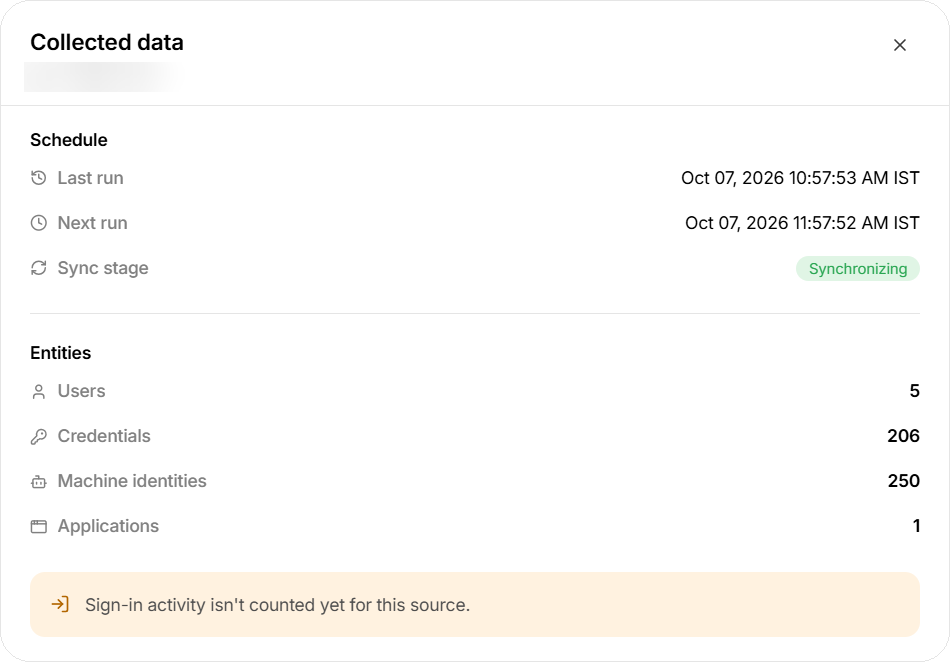
Schedule
| Field | What it shows |
|---|---|
| Last run | When the connector last collected. Never if it has not run yet |
| Next run | When it runs next. Not scheduled if no run is planned |
| Sync stage | Which stage the connector is in — see below |
| Sync stage | Meaning |
|---|---|
| Initializing | The first sync is running |
| Initializing (stalled) | The first sync stopped making progress, so Mesh paused its quick automatic re-runs. The connector keeps running on its normal schedule and returns to normal once a run makes progress. A stall usually follows failed runs — check Logs. If Sync status shows Unknown, contact Axiad support |
| Synchronizing | The first sync is complete; the connector is collecting changes |
| Stopped | The connector is turned off |
Sync stage says where the connector is; Sync status on the table says how it is going. For example, a first sync can be at stage Initializing while its Sync status is Failed.
Entities
How many records of each type Mesh holds from this connector — for example Users, Credentials, Machine identities, Groups, Applications, Machines or Software. Only types with at least one record are listed.
- These are totals, not the result of one run. For per-run counts, see Data source syncs.
- No entity data yet means nothing has arrived. If the first sync has finished, check the connector's Sync status reason.
- A message in place of the counts — such as Waiting for the first sync to complete or Failed to fetch count — means the counts are not available right now. This is common just after a connector is created. Try again later, and contact Axiad support if it persists.
- Crypto collectors list what their last run found, by category. Hover a category for what it includes.
This note appears on every connector. Sign-in activity is not included in these counts. It does not mean something is wrong with this connector.
Fix a connector
When Health is Unhealthy, or Sync status is Failed or Unknown, select ⓘ next to the status and match what it says:
| ⓘ says | What to do |
|---|---|
| Authentication failed, Credentials expired, or could not authenticate | Update the credentials with Edit (Relink for HR connectors). See Credential management |
| Authorization denied, or was denied by the provider | Grant the missing permissions in the source system |
| Connection or network error, could not reach, or could not resolve the connector endpoint DNS | Check the connector URL and that the source is reachable from Mesh |
| was blocked before the request could be sent | Check the connector URL. If it is correct, contact Axiad support |
| found a configuration error | Review the connector settings with Edit |
| is blocked from making progress | Check the connector's collection limits and endpoint settings. If you have not changed them, contact Axiad support |
| Health check unavailable, or The sync status is temporarily unavailable | Nothing on your side — see Health |
| The Azure authentication event stream cursor expired | Nothing — your credentials are fine and the stream retries on its own. If it is still shown after a day, contact Axiad support |
| encountered a system error | Open Logs. If it repeats on the next run, contact Axiad support |
| failed before completion | Open Logs for the details and match them to this table. If nothing there helps, contact Axiad support |
| has not made progress for over 24 hours | Open Logs and contact Axiad support. Kubernetes crypto collectors can try Re-sync first |
| The first sync has not produced a checkpoint yet | Wait for the first run. If it is still shown after the next scheduled run, contact Axiad support |
| The initial sync is still running | Wait. If Sync status is Failed, open Logs and check the partial runs |
| The connector is disabled | Turn Status on |
After a fix, the status updates on the connector's next run.
If you contact Axiad support, include the details in What to include in a support request, plus the connector name, its Health and Sync status, both ⓘ texts exactly as shown, the time under Sync status, and Last run from Collected data.