Service status page
The Axiad Mesh status page shows whether the Axiad Mesh services are up, lists active incidents and planned maintenance, and lets you subscribe to email updates. It's available at https://status.mesh.axiad.io/.
The status page covers the production Axiad Mesh environment only. It doesn't report on development, staging, or proof-of-concept environments, or on environments hosted outside the Axiad production cluster. If you use one of those environments, contact your Axiad account team for its availability.
Open the status page
- Go to https://status.mesh.axiad.io/ in any browser.
- From inside the product, select your name or avatar to open the user menu and select Axiad Mesh Status. The link opens in a new browser tab, so your current session is preserved.
The page is public. You don't need to sign in, so you can check it even when you can't sign in to Axiad Mesh.
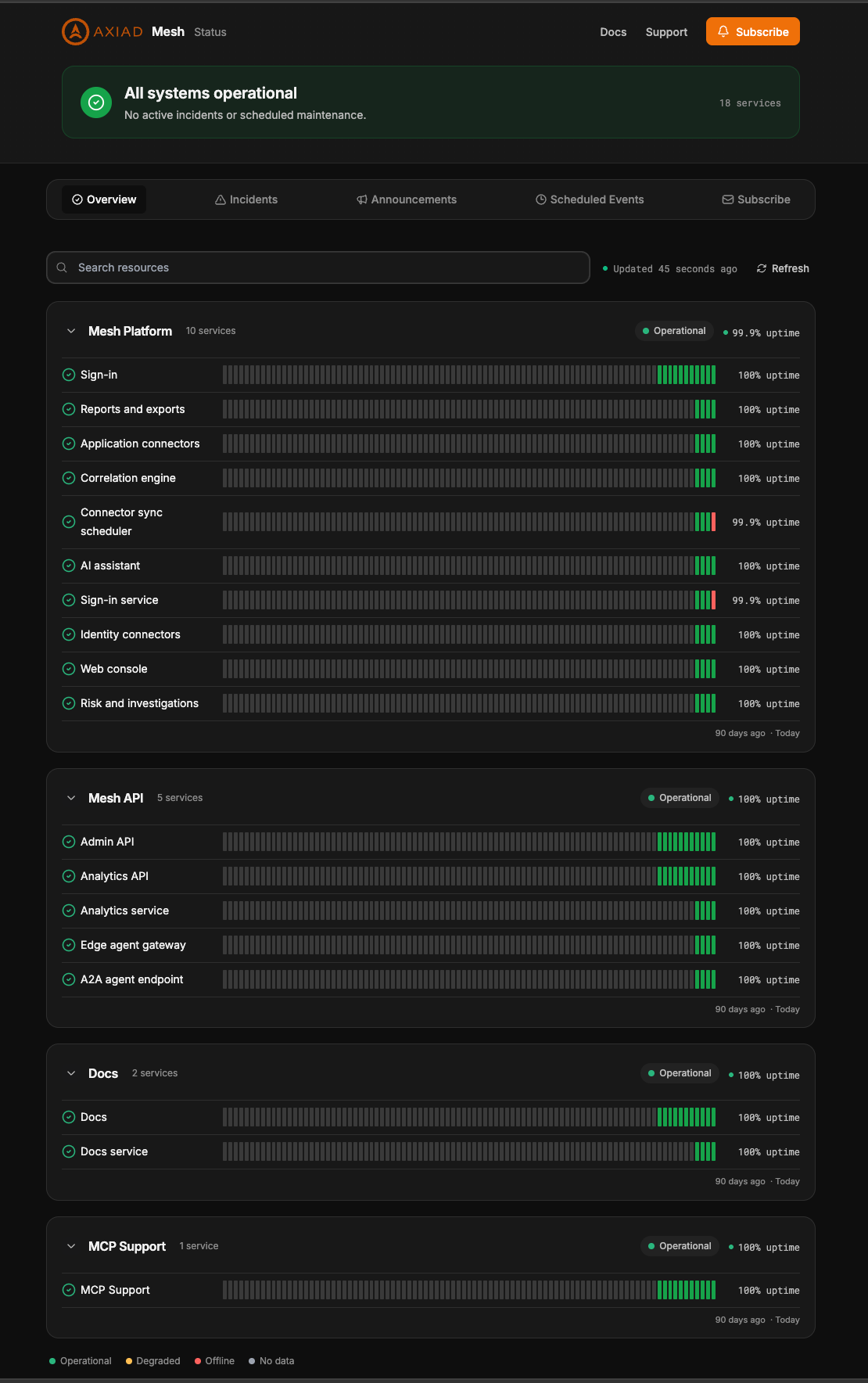
Read the Overview tab
At the top, a banner summarizes the overall state — for example All systems operational with the note "No active incidents or scheduled maintenance" — and the number of services monitored.
Below it, services are grouped. Each group shows its own overall state and uptime, and you can collapse or expand it. Each service shows a row of bars covering the last 90 days (from "90 days ago" on the left to "Today" on the right) and its uptime percentage. Each bar is one day, with dates in UTC. Select the search box, Search resources, to find a service by name. The page notes when it was last updated; select Refresh to reload it.
The color of each bar and status badge uses this legend:
| Color | Meaning |
|---|---|
| Green — Operational | The service is working normally. |
| Yellow — Degraded | The service is affected but not fully offline. |
| Red — Offline | The service is unavailable. |
| Gray — No data | No status was recorded for that day. |
What it monitors
The page monitors 18 services in four groups.
Mesh Platform
- Sign-in
- Reports and exports
- Application connectors
- Correlation engine
- Connector sync scheduler
- AI assistant
- Sign-in service
- Identity connectors
- Web console
- Risk and investigations
Mesh API
- Admin API
- Analytics API
- Analytics service
- Edge agent gateway
- A2A agent endpoint
Docs
- Docs
- Docs service
MCP Support
- MCP Support
Incidents, announcements, and scheduled events
Use the tabs under the banner to see more than current health:
- Incidents — incidents Axiad has posted to the status page. When there are none, it shows "No incidents posted on this status page."
- Announcements — announcements Axiad has posted. When there are none, it shows "No announcements posted so far on this page."
- Scheduled Events — scheduled events, such as planned maintenance. When there are none, it shows "No scheduled events posted for this status page."
The banner at the top also reflects these: it reads "No active incidents or scheduled maintenance." when there are none.
Subscribe to email updates
To get status updates by email instead of checking the page:
- On the status page, select Subscribe — either the button at the top right or the Subscribe tab.
- On the New Subscription tab, under Details, enter your email address in Your Email. All updates are sent to this address.
- Select Subscribe. The form also has a Next button and a Preferences step, shown beside Details.
To change or cancel a subscription you already have, select the Manage Existing Subscription tab instead.
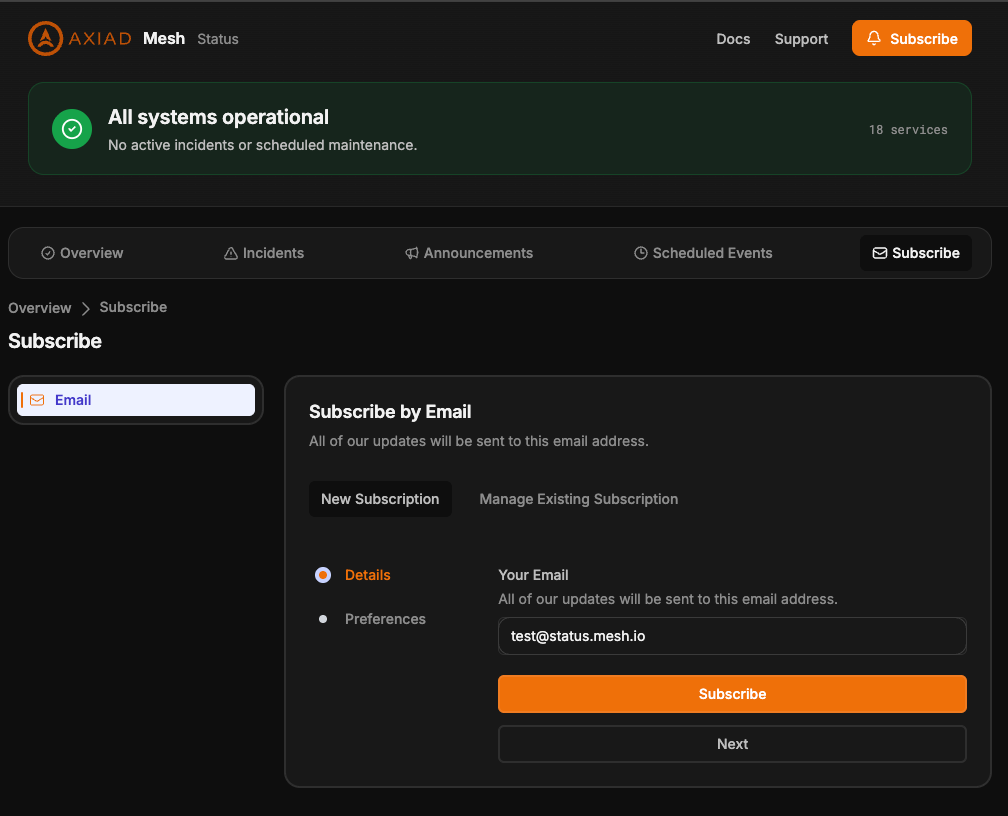
The page header also links to Docs and Support. The footer links to Documentation, the Trust Center, the privacy policy and Contact support, and has a dark mode toggle.
What it doesn't cover
- Your connectors and data sources. A healthy status page doesn't mean every connector sync succeeded. Connector problems are specific to your tenant and to the third-party system; see Troubleshooting & support and Data source syncs.
- Your own network, browser, or identity provider. If the status page shows all services operational but you can't sign in, check your sign-in identity provider and your network first.
- Non-production environments. See the note at the top of this page.
If a service shows as degraded or offline
- Refresh the page and check again after a minute or two. Brief blips can clear on their own.
- Check the Incidents and Scheduled Events tabs to see whether Axiad is already aware of the problem or has planned maintenance.
- If the problem persists, or you're affected while everything shows operational, select Support at the top of the page (it opens an email to customer.success@axiad.com), or contact Axiad support through your Axiad account team. Include the service name, the time you noticed the problem, and your tenant name.