PQC Readiness
Your cryptographic estate's post-quantum posture in one view: how ready it is today, how many assets are in scope, who owns them, how they measure against your crypto compliance policy, and which ones to address first.
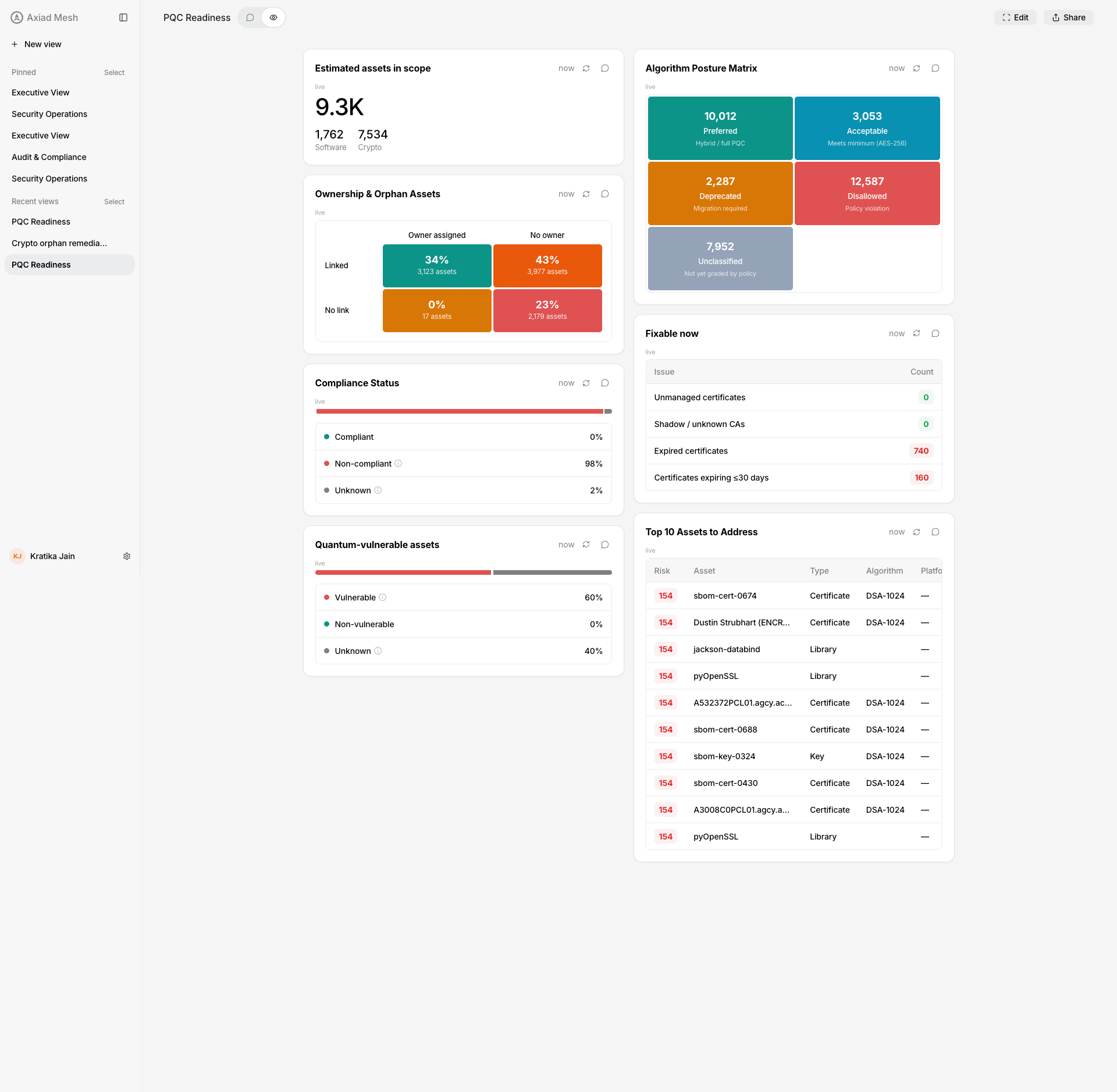
PQC readiness index
In one number, how far through post-quantum migration are we?
A single headline score out of 100: the share of your in-scope assets that already use at least one post-quantum algorithm your crypto compliance policy approves of.
An asset counts as ready when it carries at least one algorithm your policy grades Preferred or Acceptable — read only across the algorithms quantum computers actually threaten: asymmetric algorithms and key exchange. Hashes and symmetric ciphers are deliberately not counted, because approving of SHA-256 says nothing about post-quantum readiness.
That scoping is what makes the grade meaningful here. Within asymmetric algorithms and key exchange, a well-formed post-quantum policy approves only post-quantum algorithms and marks the classical ones Deprecated or Prohibited, so "approved" and "post-quantum" coincide.
The score reads your policy rather than a fixed industry list, which keeps it aligned with the standard you have adopted — but it also means your policy defines the answer. If a policy grades a classical algorithm such as RSA-4096 as Acceptable, assets using it are counted as ready, because the policy has said it is acceptable. Mesh does not override that judgement.
If your readiness score looks implausibly high, check how the named policy grades classical asymmetric algorithms before reading anything into the number. The Algorithm Posture Matrix below shows exactly which algorithms landed in each grade.
Three things the score is not, each worth knowing before quoting it:
- It is not a compliance percentage. Compliance Status and Quantum-vulnerable assets answer "does this asset satisfy the policy?" This answers "has this asset moved to post-quantum cryptography?" The two can legitimately disagree — a fully compliant estate can read 0% ready if nothing has migrated yet.
- It is not a measure of how migratable you are. It counts assets already using an approved post-quantum algorithm. Nothing here models whether the rest could be migrated, or how hard that would be.
- A hybrid asset counts as ready. An asset offering a post-quantum algorithm alongside a classical fallback is counted. The "pure PQC" caption below the score reports the stricter subset that has no classical fallback left.
Reading the per-type bars
Certificates and software are counted separately, and each bar is a share of its own total — they are not two parts of the headline and they do not sum to it. The two populations move for different reasons: software readiness shifts when a library is updated, certificate readiness only when a CA reissues, so a single blended figure would hide which of the two has actually moved.
Each bar shows the ready count against that type's own total, not just a percentage — at estate scale a bare "0.00%" is indistinguishable from missing data, while the raw pair keeps the size of the estate visible.
Reading the captions
- "N% of ready assets are pure PQC (no classical fallback)" — the second number, measured within the ready set rather than the whole estate. Early in a migration this is usually low: hybrid deployments come first.
- "Scored against <policy>" — the score is policy-relative. Two
organizations with identical estates and different policies get different
scores, so the widget names the policy that produced this one. When more than
one policy is active you will see
(+N more active policies); the score is graded against all of them.
The headline is counted over your whole in-scope estate, including assets that carry no quantum-exposed cryptography at all. Those assets sit in the denominator but can never enter the numerator, so on a typical estate the score has a ceiling well below 100 — and it can only ever understate readiness, never overstate it. Read it as a trend line to move upward over time, not as a percentage to drive to 100.
When the score does not appear
The widget reports a data refresh instead of a number when your organization has no active crypto compliance policy, or when no algorithm data has been collected yet.
It will also decline to publish a score when your policy grades the same algorithm at more than one level in a way the index cannot resolve — for example, if two rules for the same algorithm and key size disagree. Mesh would rather show you nothing than a confidently wrong number. Grading an algorithm differently by key size is normal and fully supported: a policy with a 3072-bit floor can grade RSA-2048 and RSA-4096 differently without affecting the score.
Estimated assets in scope
How big is the problem?
The total count of software and cryptographic assets Mesh has discovered in your environment, split by kind. Selecting a count opens the asset list, pre-filtered to that kind.
Ownership & Orphan Assets
Who is responsible for what — and what has no owner at all?
A quadrant of owner-assigned vs. no-owner against linked vs. not-linked assets. The bottom-right cell — no owner, no link — is your orphan population: assets nobody would think to migrate. Selecting a cell opens the asset list with those filters applied.
Compliance Status
How much of the estate meets the active crypto policy?
Compliant, non-compliant, and unknown shares of your assets, judged against the organization's in-force crypto compliance policy.
Quantum-vulnerable assets
How much of the estate is exposed to quantum attack?
The share of assets using quantum-vulnerable cryptography, with unknowns reported honestly rather than counted as safe.
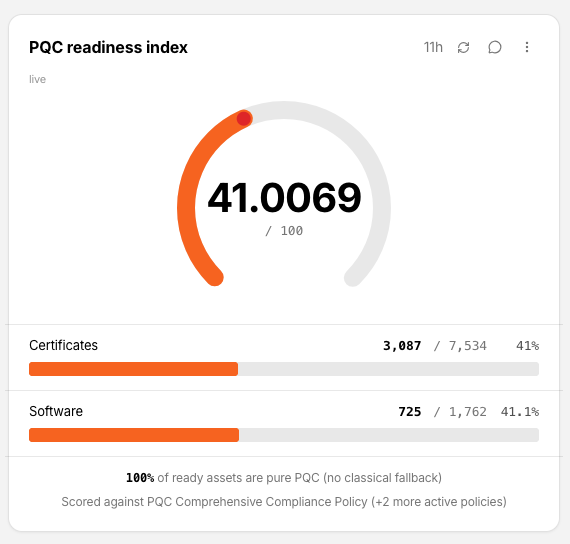
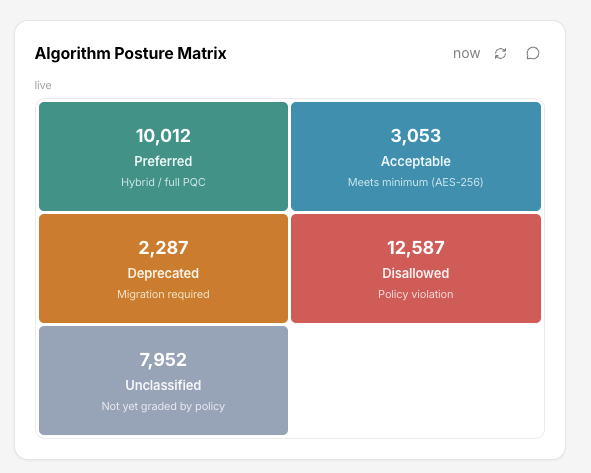
Algorithm Posture Matrix
Of everything we discovered, how much uses algorithms our policy considers good, aging, or unacceptable?
Every discovered asset is graded against your organization's active crypto compliance policy into five tiles — Preferred, Acceptable, Deprecated, Disallowed, and Unclassified (observed, but not yet graded by your policy). The grading is read from your policy, not a fixed industry list, and key size is part of the grade: a policy with a 3072-bit floor grades RSA-2048 as Disallowed and RSA-4096 as Acceptable.
Select a tile to open a drill-down that lists which algorithms make up the category, how many assets use each one, and a sample of those assets:
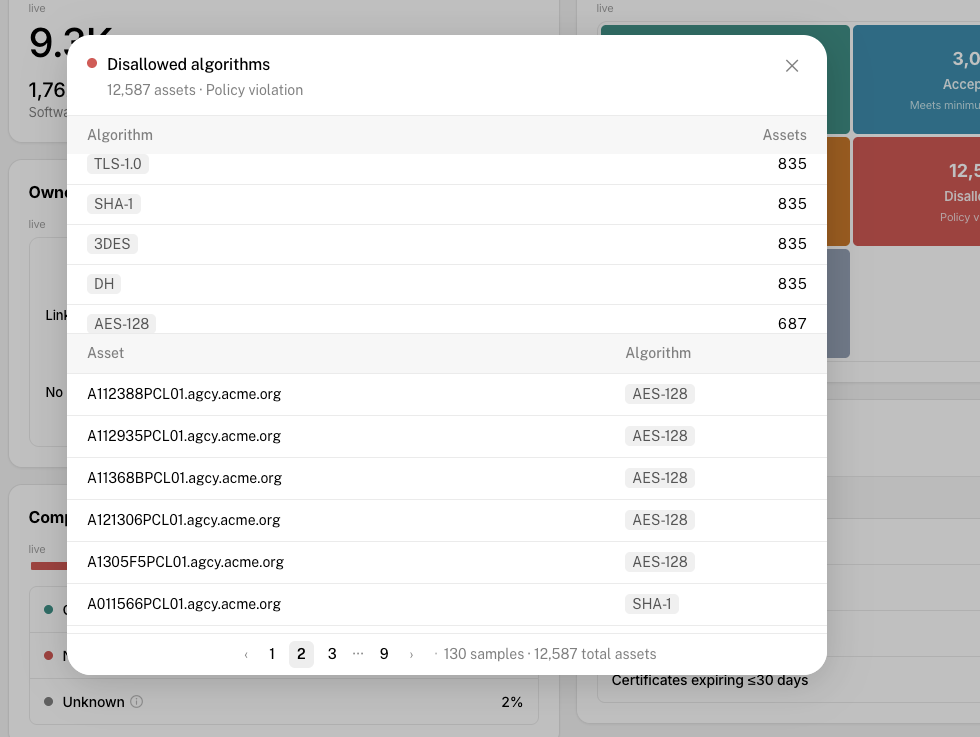
A few things to know when reading the counts:
- Preferred can legitimately read 0. The matrix counts only algorithms Mesh has actually observed. A zero means no preferred algorithm has been detected in your environment — not that the tile is broken.
- Unclassified is a to-do list for your policy, not a clean bill of health. A large count means your policy needs additional rules, not that those assets are safe.
- The matrix covers crypto and software assets; machine assets are not included in these counts.
- If your organization has no active crypto compliance policy, or no data has been collected yet, the matrix reports that a data refresh is in progress instead of showing counts.
The Disallowed tile corresponds to the Prohibited level in your crypto compliance policy.
Fixable now
What can we clean up today?
Certificate hygiene issues with a clear, immediate fix — unmanaged certificates, shadow or unknown CAs, expired certificates, and certificates expiring within 30 days.
Top 10 Assets to Address
If we start migrating tomorrow, where do we start?
The highest-risk assets in the crypto estate, by name, with their type and algorithm. Selecting a row opens the asset drill-down.