Analytics OData API Reference
Read-only, tenant-isolated OData v4 interface for Mesh analytics data. Browse the entity sets below and query them with standard OData options (for example from Power BI Desktop via Get Data → OData Feed).
Authentication
Method: OAuth 2.0 / OIDC (user-authenticated)
The API is read-only and strictly tenant-isolated. Requests are authenticated with organization-approved user credentials (SSO / OAuth2 / OIDC), aligned with Mesh Dashboard authentication; each dataset is scoped to a single tenant. Send the bearer token in the Authorization header.
Connecting Power BI
The feed is designed to be consumed directly by Power BI Desktop.
-
Choose Get Data → OData Feed.
-
Enter your feed URL:
https://<your-mesh-host>/api/analytics/v1?tenant=<your-domain>If your organization has a dedicated Mesh subdomain, the tenant is resolved from the hostname and you can omit
?tenant=entirely. -
When prompted for credentials, choose Organizational account and sign in. Anonymous and Basic authentication are not supported.
-
Power BI reads the service metadata and lists every entity set. Select the tables you need, then choose Transform data or Load.
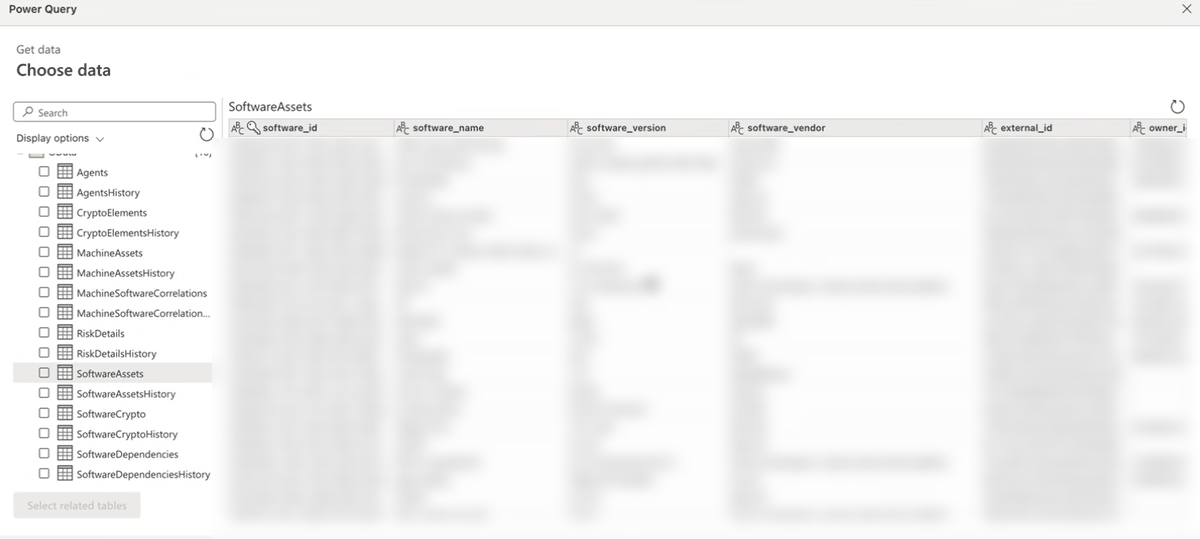
Power BI follows @odata.nextLink automatically, so large entity sets import
without any special pagination setup. Very large imports are still bound by
Power BI's own dataset-size and refresh-timeout limits.
What the main entity sets describe
Mesh maps your estate as three connected things — your software, the cryptography it uses, and the machines it runs on. Each entity set below is flat and readable on its own, so you rarely need to join tables:
SoftwareAssets— your software components, and the application and project each belongs to.SoftwareDependencies— what each component depends on, both ends inline.SoftwareCrypto— the cryptography each component uses, with any policy violations.CryptoElements— every cryptographic element and its post-quantum rating.MachineAssets— your machines (servers, VMs, endpoints) and their risk.MachineSoftwareCorrelations— which software runs on which machine, both ends inline.
Policy violations appear right on the software and crypto rows —
violating_algorithms names the non-compliant algorithms and violation_count
counts them — so a single filter finds everything that is out of policy.
Worked examples
Each example is a Power Query (M) formula. After connecting with your
Organizational account (see Connecting Power BI), open Home →
Transform data, add a Blank query, and paste the formula into the formula
bar (or Advanced Editor). Replace <your-mesh-host> with your Mesh host and
<your-domain> with your tenant domain, then fill in the remaining <...>
placeholders with your own values. Drop the leading tenant=<your-domain>& only
if your organization has a dedicated Mesh subdomain that resolves the tenant from
the hostname.
Software whose cryptography violates policy, with the offending algorithms
listed inline — join-free, straight from SoftwareCrypto:
= OData.Feed("https://<your-mesh-host>/api/analytics/v1/SoftwareCrypto?tenant=<your-domain>&$filter=violation_count gt 0&$select=software_name,software_version,software_purl,crypto_name,violating_algorithms,violation_count")
Everything a single component depends on:
= OData.Feed("https://<your-mesh-host>/api/analytics/v1/SoftwareDependencies?tenant=<your-domain>&$filter=software_key eq '<component-key>'&$select=software_name,depends_on_name,depends_on_version,depends_on_purl")
One application's bill of materials, rolled up by parent component:
= OData.Feed("https://<your-mesh-host>/api/analytics/v1/SoftwareAssets?tenant=<your-domain>&$filter=project_key eq '<project-key>'&$select=parent_key,software_name,software_version,purl&$orderby=parent_key,software_name")
Every piece of software installed on a given machine, with its risk and compliance status:
= OData.Feed("https://<your-mesh-host>/api/analytics/v1/MachineSoftwareCorrelations?tenant=<your-domain>&$filter=machine_id eq '<machine-id>'&$select=machine_name,software_name,software_version,software_risk_score,software_compliance_status")
Relating the entity sets
If you build a Power BI model across several tables, these are the keys:
| Relationship | Join on |
|---|---|
| Component to its parent application | SoftwareAssets.parent_id = SoftwareAssets.software_id |
| Dependency edge to component | SoftwareDependencies.software_key = SoftwareAssets.software_key |
| Crypto element to its component | CryptoElements.parent_id = SoftwareAssets.software_id |
| Crypto usage to its component | SoftwareCrypto.software_key = SoftwareAssets.software_key |
| Everything in one bill of materials | project_key, on all of the above |
Where parent_id is not populated, fall back to matching parent_key
against software_key.
Entity sets
| Entity set | Entity type |
|---|---|
Agents | Agent |
AgentsHistory | AgentsHistory |
CryptoElements | CryptoElement |
CryptoElementsHistory | CryptoElementsHistory |
MachineAssets | MachineAsset |
MachineAssetsHistory | MachineAssetsHistory |
MachineSoftwareCorrelations | MachineSoftwareCorrelation |
MachineSoftwareCorrelationsHistory | MachineSoftwareCorrelationsHistory |
RiskDetails | RiskDetail |
RiskDetailsHistory | RiskDetailsHistory |
SoftwareAssets | SoftwareAsset |
SoftwareAssetsHistory | SoftwareAssetsHistory |
SoftwareCrypto | SoftwareCrypto |
SoftwareCryptoHistory | SoftwareCryptoHistory |
SoftwareDependencies | SoftwareDependency |
SoftwareDependenciesHistory | SoftwareDependenciesHistory |
Entity types
Agent
| Property | Description | Nullable | Key |
|---|---|---|---|
id | Unique identifier. | Yes | No |
agent_id | Unique identifier of the Mesh agent. | No | Yes |
agent_key | Stable natural key for the agent. | Yes | No |
provider | Source the data was ingested from (for example, servicenowcmdb or offline). | Yes | No |
display_name | Human-readable display name. | Yes | No |
agent_type | Kind of agent. | Yes | No |
external_id | Identifier of the record in the source system it was ingested from. | Yes | No |
app_external_id | External identifier of the associated application. | Yes | No |
owner_id | Identifier of the owning user. | Yes | No |
owner_key | Natural key of the owner. | Yes | No |
creator_id | Identifier of the user or process that created the record. | Yes | No |
creator_key | Natural key of the creator. | Yes | No |
executor_id | Identifier of the executor. | Yes | No |
executor_key | Natural key of the executor. | Yes | No |
score | Computed score. | Yes | No |
score_aggregated | Aggregated score across related items. | Yes | No |
attributes | Additional attributes, as structured JSON. | Yes | No |
metadata | Additional metadata from the source system, as structured JSON. | Yes | No |
top_risk_description | Plain-language description of the highest-severity risk on this item. | Yes | No |
top_risk_remediation | Recommended remediation for the highest-severity risk. | Yes | No |
computed_at | When Mesh last computed this row. | Yes | No |
valid_from | Start of the period this version of the row is valid for. | Yes | No |
valid_to | End of the period this version is valid for; empty for the current row. | Yes | No |
is_current | True for the latest version of the row. | Yes | No |
AgentsHistory
Agents as they were on a past date. Add a snapshot_date filter to choose the day — it is required, and without it the query returns no rows.
| Property | Description | Nullable | Key |
|---|---|---|---|
id | Unique identifier. | No | No |
agent_id | Unique identifier of the Mesh agent. | No | Yes |
agent_key | Stable natural key for the agent. | Yes | No |
provider | Source the data was ingested from (for example, servicenowcmdb or offline). | Yes | No |
display_name | Human-readable display name. | Yes | No |
agent_type | Kind of agent. | Yes | No |
external_id | Identifier of the record in the source system it was ingested from. | Yes | No |
app_external_id | External identifier of the associated application. | Yes | No |
owner_id | Identifier of the owning user. | Yes | No |
owner_key | Natural key of the owner. | Yes | No |
creator_id | Identifier of the user or process that created the record. | Yes | No |
creator_key | Natural key of the creator. | Yes | No |
executor_id | Identifier of the executor. | Yes | No |
executor_key | Natural key of the executor. | Yes | No |
score | Computed score. | Yes | No |
score_aggregated | Aggregated score across related items. | Yes | No |
attributes | Additional attributes, as structured JSON. | Yes | No |
metadata | Additional metadata from the source system, as structured JSON. | Yes | No |
top_risk_description | Plain-language description of the highest-severity risk on this item. | Yes | No |
top_risk_remediation | Recommended remediation for the highest-severity risk. | Yes | No |
computed_at | When Mesh last computed this row. | Yes | No |
valid_from | Start of the period this version of the row is valid for. | No | No |
valid_to | End of the period this version is valid for; empty for the current row. | Yes | No |
is_current | True for the latest version of the row. | No | No |
snapshot_date | The date this row's data reflects (its snapshot date). | No | Yes |
CryptoElement
| Property | Description | Nullable | Key |
|---|---|---|---|
crypto_element_id | System-assigned unique identifier for the cryptographic element. | No | Yes |
name | Name of the cryptographic element (for example, a certificate or key). | Yes | No |
external_id | Identifier of the record in the source system it was ingested from. | Yes | No |
crypto_category | Category of the cryptographic element, such as Certificate or Key. | Yes | No |
algorithms | Algorithms detected in this element, as structured JSON. | Yes | No |
expiration_date | Date the element expires. | Yes | No |
machine_asset_id | Identifier of the machine this cryptographic element was found on. | Yes | No |
machine_asset_name | Name of the machine this cryptographic element was found on. | Yes | No |
platform | Operating system or platform (for example, Amazon Linux 2023). | Yes | No |
owner_id | Identifier of the owning user. | Yes | No |
owner_org_names | Names of the owning organizations. | Yes | No |
location_names | Locations associated with the asset. | Yes | No |
risk_score | Computed risk score; higher is riskier. | Yes | No |
state | Lifecycle state code. | Yes | No |
status | Status of the item, such as Active. | Yes | No |
certificate_template_name | Certificate template the item was issued from. | Yes | No |
signature_algorithm | Signature algorithm (certificates). | Yes | No |
public_key_algorithm | Public-key algorithm (certificates). | Yes | No |
hashing_algorithm | Hashing algorithm (certificates). | Yes | No |
key_size | Key size, in bits. | Yes | No |
serial_number | Certificate serial number. | Yes | No |
issuer_dn | Certificate issuer distinguished name. | Yes | No |
owner_name | Name of the owner. | Yes | No |
owner_email | Email address of the owner. | Yes | No |
owner_group | Owning group. | Yes | No |
risk_profiles | Comma-separated risk categories that apply (for example, nonCompliance.PQC, orphan.noOwner). | Yes | No |
top_risk_description | Plain-language description of the highest-severity risk on this item. | Yes | No |
top_risk_remediation | Recommended remediation for the highest-severity risk. | Yes | No |
total_risks | Total number of risk findings on this item. | Yes | No |
expiration_timestamp | Exact timestamp at which the element expires. | Yes | No |
computed_at | When Mesh last computed this row. | Yes | No |
owner_org_ids | Identifiers of the owning organizations. | Yes | No |
provider | Source the data was ingested from (for example, servicenowcmdb or offline). | Yes | No |
valid_from | Start of the period this version of the row is valid for. | Yes | No |
valid_to | End of the period this version is valid for; empty for the current row. | Yes | No |
is_current | True for the latest version of the row. | Yes | No |
violating_algorithms | The specific algorithms on this item that violate the active crypto policy, each with its status — for example, RSA (PROHIBITED); SHA-1 (DEPRECATED). Empty when the item has no violations. | Yes | No |
violation_count | Number of policy-violating algorithms on this item. Filter for a value above 0 to find non-compliant items. | Yes | No |
parent_id | System identifier of the parent application this component rolls up to. | Yes | No |
parent_key | Natural key of the parent application. Use it to roll a component up to the application that contains it. | Yes | No |
project_key | Groups everything in one bill of materials (project to application to components). | Yes | No |
nist_quantum_security_level | NIST post-quantum security level (0-5). Lower is more quantum-vulnerable; filter for a value below 3 to find weak cryptography. | Yes | No |
crypto_primitive | Cryptographic primitive, such as signature, encryption, or hash. | Yes | No |
CryptoElementsHistory
Cryptographic elements as they were on a past date. Add a snapshot_date filter to choose the day — it is required, and without it the query returns no rows.
| Property | Description | Nullable | Key |
|---|---|---|---|
crypto_element_id | System-assigned unique identifier for the cryptographic element. | No | Yes |
name | Name of the cryptographic element (for example, a certificate or key). | Yes | No |
external_id | Identifier of the record in the source system it was ingested from. | No | No |
crypto_category | Category of the cryptographic element, such as Certificate or Key. | Yes | No |
algorithms | Algorithms detected in this element, as structured JSON. | Yes | No |
expiration_date | Date the element expires. | Yes | No |
machine_asset_id | Identifier of the machine this cryptographic element was found on. | Yes | No |
machine_asset_name | Name of the machine this cryptographic element was found on. | Yes | No |
platform | Operating system or platform (for example, Amazon Linux 2023). | Yes | No |
owner_id | Identifier of the owning user. | Yes | No |
owner_org_names | Names of the owning organizations. | Yes | No |
location_names | Locations associated with the asset. | Yes | No |
risk_score | Computed risk score; higher is riskier. | Yes | No |
state | Lifecycle state code. | Yes | No |
status | Status of the item, such as Active. | Yes | No |
certificate_template_name | Certificate template the item was issued from. | Yes | No |
signature_algorithm | Signature algorithm (certificates). | Yes | No |
public_key_algorithm | Public-key algorithm (certificates). | Yes | No |
hashing_algorithm | Hashing algorithm (certificates). | Yes | No |
key_size | Key size, in bits. | Yes | No |
serial_number | Certificate serial number. | Yes | No |
issuer_dn | Certificate issuer distinguished name. | Yes | No |
owner_name | Name of the owner. | Yes | No |
owner_email | Email address of the owner. | Yes | No |
owner_group | Owning group. | Yes | No |
risk_profiles | Comma-separated risk categories that apply (for example, nonCompliance.PQC, orphan.noOwner). | Yes | No |
top_risk_description | Plain-language description of the highest-severity risk on this item. | Yes | No |
top_risk_remediation | Recommended remediation for the highest-severity risk. | Yes | No |
total_risks | Total number of risk findings on this item. | Yes | No |
expiration_timestamp | Exact timestamp at which the element expires. | Yes | No |
computed_at | When Mesh last computed this row. | Yes | No |
snapshot_date | The date this row's data reflects (its snapshot date). | No | Yes |
owner_org_ids | Identifiers of the owning organizations. | Yes | No |
provider | Source the data was ingested from (for example, servicenowcmdb or offline). | No | No |
valid_from | Start of the period this version of the row is valid for. | Yes | No |
valid_to | End of the period this version is valid for; empty for the current row. | Yes | No |
is_current | True for the latest version of the row. | Yes | No |
violating_algorithms | The specific algorithms on this item that violate the active crypto policy, each with its status — for example, RSA (PROHIBITED); SHA-1 (DEPRECATED). Empty when the item has no violations. | Yes | No |
violation_count | Number of policy-violating algorithms on this item. Filter for a value above 0 to find non-compliant items. | Yes | No |
parent_id | System identifier of the parent application this component rolls up to. | Yes | No |
parent_key | Natural key of the parent application. Use it to roll a component up to the application that contains it. | Yes | No |
project_key | Groups everything in one bill of materials (project to application to components). | Yes | No |
nist_quantum_security_level | NIST post-quantum security level (0-5). Lower is more quantum-vulnerable; filter for a value below 3 to find weak cryptography. | Yes | No |
crypto_primitive | Cryptographic primitive, such as signature, encryption, or hash. | Yes | No |
MachineAsset
| Property | Description | Nullable | Key |
|---|---|---|---|
machine_id | Unique identifier of the machine asset. | No | Yes |
name | Name of the machine (for example, its hostname). | Yes | No |
machine_type | Kind of machine, such as vm or laptop. | Yes | No |
os | Operating system and version. | Yes | No |
manufacturer | Hardware manufacturer. | Yes | No |
external_id | Identifier of the record in the source system it was ingested from. | Yes | No |
owner_id | Identifier of the owning user. | Yes | No |
owner_org_names | Names of the owning organizations. | Yes | No |
location_names | Locations associated with the asset. | Yes | No |
risk_score | Computed risk score; higher is riskier. | Yes | No |
state | Lifecycle state code. | Yes | No |
status | Status of the item, such as Active. | Yes | No |
owner_name | Name of the owner. | Yes | No |
owner_email | Email address of the owner. | Yes | No |
owner_group | Owning group. | Yes | No |
risk_profiles | Comma-separated risk categories that apply (for example, nonCompliance.PQC, orphan.noOwner). | Yes | No |
top_risk_description | Plain-language description of the highest-severity risk on this item. | Yes | No |
top_risk_remediation | Recommended remediation for the highest-severity risk. | Yes | No |
total_risks | Total number of risk findings on this item. | Yes | No |
computed_at | When Mesh last computed this row. | Yes | No |
owner_org_ids | Identifiers of the owning organizations. | Yes | No |
provider | Source the data was ingested from (for example, servicenowcmdb or offline). | Yes | No |
attributes | Additional attributes, as structured JSON. | Yes | No |
metadata | Additional metadata from the source system, as structured JSON. | Yes | No |
valid_from | Start of the period this version of the row is valid for. | Yes | No |
valid_to | End of the period this version is valid for; empty for the current row. | Yes | No |
is_current | True for the latest version of the row. | Yes | No |
MachineAssetsHistory
Machines as they were on a past date. Add a snapshot_date filter to choose the day — it is required, and without it the query returns no rows.
| Property | Description | Nullable | Key |
|---|---|---|---|
machine_id | Unique identifier of the machine asset. | No | Yes |
name | Name of the machine (for example, its hostname). | Yes | No |
machine_type | Kind of machine, such as vm or laptop. | Yes | No |
os | Operating system and version. | No | No |
manufacturer | Hardware manufacturer. | Yes | No |
external_id | Identifier of the record in the source system it was ingested from. | No | No |
owner_id | Identifier of the owning user. | Yes | No |
owner_org_names | Names of the owning organizations. | Yes | No |
location_names | Locations associated with the asset. | Yes | No |
risk_score | Computed risk score; higher is riskier. | Yes | No |
state | Lifecycle state code. | Yes | No |
status | Status of the item, such as Active. | Yes | No |
owner_name | Name of the owner. | Yes | No |
owner_email | Email address of the owner. | Yes | No |
owner_group | Owning group. | Yes | No |
risk_profiles | Comma-separated risk categories that apply (for example, nonCompliance.PQC, orphan.noOwner). | Yes | No |
top_risk_description | Plain-language description of the highest-severity risk on this item. | Yes | No |
top_risk_remediation | Recommended remediation for the highest-severity risk. | Yes | No |
total_risks | Total number of risk findings on this item. | Yes | No |
computed_at | When Mesh last computed this row. | Yes | No |
snapshot_date | The date this row's data reflects (its snapshot date). | No | Yes |
owner_org_ids | Identifiers of the owning organizations. | Yes | No |
provider | Source the data was ingested from (for example, servicenowcmdb or offline). | No | No |
attributes | Additional attributes, as structured JSON. | Yes | No |
metadata | Additional metadata from the source system, as structured JSON. | Yes | No |
valid_from | Start of the period this version of the row is valid for. | Yes | No |
valid_to | End of the period this version is valid for; empty for the current row. | Yes | No |
is_current | True for the latest version of the row. | Yes | No |
MachineSoftwareCorrelation
| Property | Description | Nullable | Key |
|---|---|---|---|
correlation_id | Unique identifier linking a machine to the software installed on it. | No | Yes |
machine_id | Unique identifier of the machine asset. | Yes | No |
machine_name | Name of the machine (for example, its hostname). | Yes | No |
machine_type | Kind of machine, such as vm or laptop. | Yes | No |
machine_os | Operating system of the machine. | Yes | No |
software_id | System-assigned unique identifier for the software component. | Yes | No |
software_name | Component name (for example, spring-core). | Yes | No |
software_version | Component version. | Yes | No |
software_vendor | Publisher or vendor of the component. | Yes | No |
install_date | Date the software was installed on the machine. | Yes | No |
install_date_source | How the install date was determined. | Yes | No |
machine_risk_score | Risk score of the machine; higher is riskier. | Yes | No |
software_risk_score | Risk score of the software; higher is riskier. | Yes | No |
combined_risk_score | Combined risk score for this machine-and-software pairing. | Yes | No |
software_compliance_status | Whether the installed software meets policy (for example, compliant, non_compliant, or unknown). | Yes | No |
machine_owner_id | Identifier of the machine's owner. | Yes | No |
software_owner_id | Identifier of the software's owner. | Yes | No |
machine_owner_org_ids | Identifiers of the machine owner's organizations. | Yes | No |
machine_owner_org_names | Names of the machine owner's organizations. | Yes | No |
software_owner_org_ids | Identifiers of the software owner's organizations. | Yes | No |
software_owner_org_names | Names of the software owner's organizations. | Yes | No |
location_names | Locations associated with the asset. | Yes | No |
computed_at | When Mesh last computed this row. | Yes | No |
machine_provider | Source the machine record was ingested from. | Yes | No |
software_provider | Source the software record was ingested from. | Yes | No |
machine_attributes | Machine attributes such as CPU, memory, and serial number, as structured JSON. | Yes | No |
machine_metadata | Machine metadata from the source system, as structured JSON. | Yes | No |
valid_from | Start of the period this version of the row is valid for. | Yes | No |
valid_to | End of the period this version is valid for; empty for the current row. | Yes | No |
is_current | True for the latest version of the row. | Yes | No |
MachineSoftwareCorrelationsHistory
Machine-to-software links as they were on a past date. Add a snapshot_date filter to choose the day — it is required, and without it the query returns no rows.
| Property | Description | Nullable | Key |
|---|---|---|---|
correlation_id | Unique identifier linking a machine to the software installed on it. | No | Yes |
machine_id | Unique identifier of the machine asset. | Yes | No |
machine_name | Name of the machine (for example, its hostname). | Yes | No |
machine_type | Kind of machine, such as vm or laptop. | Yes | No |
machine_os | Operating system of the machine. | Yes | No |
machine_provider | Source the machine record was ingested from. | Yes | No |
machine_attributes | Machine attributes such as CPU, memory, and serial number, as structured JSON. | Yes | No |
machine_metadata | Machine metadata from the source system, as structured JSON. | Yes | No |
software_id | System-assigned unique identifier for the software component. | Yes | No |
software_name | Component name (for example, spring-core). | Yes | No |
software_version | Component version. | Yes | No |
software_vendor | Publisher or vendor of the component. | Yes | No |
software_provider | Source the software record was ingested from. | Yes | No |
install_date | Date the software was installed on the machine. | Yes | No |
install_date_source | How the install date was determined. | Yes | No |
machine_risk_score | Risk score of the machine; higher is riskier. | Yes | No |
software_risk_score | Risk score of the software; higher is riskier. | Yes | No |
combined_risk_score | Combined risk score for this machine-and-software pairing. | Yes | No |
software_compliance_status | Whether the installed software meets policy (for example, compliant, non_compliant, or unknown). | Yes | No |
machine_owner_id | Identifier of the machine's owner. | Yes | No |
machine_owner_org_ids | Identifiers of the machine owner's organizations. | Yes | No |
machine_owner_org_names | Names of the machine owner's organizations. | Yes | No |
software_owner_id | Identifier of the software's owner. | Yes | No |
software_owner_org_ids | Identifiers of the software owner's organizations. | Yes | No |
software_owner_org_names | Names of the software owner's organizations. | Yes | No |
location_names | Locations associated with the asset. | Yes | No |
computed_at | When Mesh last computed this row. | Yes | No |
snapshot_date | The date this row's data reflects (its snapshot date). | No | Yes |
RiskDetail
| Property | Description | Nullable | Key |
|---|---|---|---|
risk_id | Unique identifier of the risk finding. | No | Yes |
risk_category | Category of the risk. | Yes | No |
risk_profile | The risk category this finding belongs to. | No | Yes |
risk_source | Where the risk was detected. | Yes | No |
score | Computed score. | Yes | No |
risk_type | Type of risk. | Yes | No |
description | Plain-language description of the risk. | Yes | No |
remediation | Recommended remediation for the risk. | Yes | No |
metadata | Additional metadata from the source system, as structured JSON. | Yes | No |
snapshot_date | The date this row's data reflects (its snapshot date). | Yes | No |
computed_at | When Mesh last computed this row. | Yes | No |
valid_from | Start of the period this version of the row is valid for. | Yes | No |
valid_to | End of the period this version is valid for; empty for the current row. | Yes | No |
is_current | True for the latest version of the row. | Yes | No |
RiskDetailsHistory
Risk findings as they were on a past date. Add a snapshot_date filter to choose the day — it is required, and without it the query returns no rows.
| Property | Description | Nullable | Key |
|---|---|---|---|
risk_id | Unique identifier of the risk finding. | No | Yes |
risk_category | Category of the risk. | No | No |
risk_profile | The risk category this finding belongs to. | No | Yes |
risk_source | Where the risk was detected. | Yes | No |
score | Computed score. | Yes | No |
risk_type | Type of risk. | Yes | No |
description | Plain-language description of the risk. | Yes | No |
remediation | Recommended remediation for the risk. | Yes | No |
metadata | Additional metadata from the source system, as structured JSON. | Yes | No |
snapshot_date | The date this row's data reflects (its snapshot date). | No | Yes |
computed_at | When Mesh last computed this row. | Yes | No |
valid_from | Start of the period this version of the row is valid for. | Yes | No |
valid_to | End of the period this version is valid for; empty for the current row. | Yes | No |
is_current | True for the latest version of the row. | Yes | No |
SoftwareAsset
| Property | Description | Nullable | Key |
|---|---|---|---|
software_id | System-assigned unique identifier for the software component. | No | Yes |
software_name | Component name (for example, spring-core). | Yes | No |
software_version | Component version. | Yes | No |
software_vendor | Publisher or vendor of the component. | Yes | No |
external_id | Identifier of the record in the source system it was ingested from. | Yes | No |
owner_id | Identifier of the owning user. | Yes | No |
owner_org_names | Names of the owning organizations. | Yes | No |
location_names | Locations associated with the asset. | Yes | No |
risk_score | Computed risk score; higher is riskier. | Yes | No |
installed_machines | Number of machines the component is installed on. | Yes | No |
platform | Operating system or platform (for example, Amazon Linux 2023). | Yes | No |
owner_name | Name of the owner. | Yes | No |
owner_email | Email address of the owner. | Yes | No |
owner_group | Owning group. | Yes | No |
risk_profiles | Comma-separated risk categories that apply (for example, nonCompliance.PQC, orphan.noOwner). | Yes | No |
top_risk_description | Plain-language description of the highest-severity risk on this item. | Yes | No |
top_risk_remediation | Recommended remediation for the highest-severity risk. | Yes | No |
total_risks | Total number of risk findings on this item. | Yes | No |
snapshot_date | The date this row's data reflects (its snapshot date). | Yes | No |
computed_at | When Mesh last computed this row. | Yes | No |
owner_org_ids | Identifiers of the owning organizations. | Yes | No |
provider | Source the data was ingested from (for example, offline for uploaded SBOM/CBOM data). The SBOM hierarchy columns (parent_key, project_key, purl) populate only on offline rows. | Yes | No |
valid_from | Start of the period this version of the row is valid for. | Yes | No |
valid_to | End of the period this version is valid for; empty for the current row. | Yes | No |
is_current | True for the latest version of the row. | Yes | No |
status | Status of the item, such as Active. | Yes | No |
type | Type classification of the component. | Yes | No |
product | Product the component belongs to. | Yes | No |
violating_algorithms | The specific algorithms on this item that violate the active crypto policy, each with its status — for example, RSA (PROHIBITED); SHA-1 (DEPRECATED). Empty when the item has no violations. | Yes | No |
violation_count | Number of policy-violating algorithms on this item. Filter for a value above 0 to find non-compliant items. | Yes | No |
software_key | Stable natural key for the component. Use it to join dependency and crypto rows back to this asset. | Yes | No |
software_type | Kind of software, such as library or application. | Yes | No |
parent_id | System identifier of the parent application this component rolls up to. | Yes | No |
parent_key | Natural key of the parent application. Use it to roll a component up to the application that contains it. | Yes | No |
project_key | Groups everything in one bill of materials (project to application to components). | Yes | No |
purl | Package URL (purl) — the canonical package identity, for matching against external vulnerability sources. | Yes | No |
SoftwareAssetsHistory
Software components as they were on a past date. Add a snapshot_date filter to choose the day — it is required, and without it the query returns no rows.
| Property | Description | Nullable | Key |
|---|---|---|---|
software_id | System-assigned unique identifier for the software component. | No | Yes |
software_name | Component name (for example, spring-core). | Yes | No |
software_version | Component version. | Yes | No |
software_vendor | Publisher or vendor of the component. | Yes | No |
external_id | Identifier of the record in the source system it was ingested from. | Yes | No |
owner_id | Identifier of the owning user. | Yes | No |
owner_org_names | Names of the owning organizations. | Yes | No |
location_names | Locations associated with the asset. | Yes | No |
risk_score | Computed risk score; higher is riskier. | Yes | No |
installed_machines | Number of machines the component is installed on. | Yes | No |
platform | Operating system or platform (for example, Amazon Linux 2023). | Yes | No |
owner_name | Name of the owner. | Yes | No |
owner_email | Email address of the owner. | Yes | No |
owner_group | Owning group. | Yes | No |
risk_profiles | Comma-separated risk categories that apply (for example, nonCompliance.PQC, orphan.noOwner). | Yes | No |
top_risk_description | Plain-language description of the highest-severity risk on this item. | Yes | No |
top_risk_remediation | Recommended remediation for the highest-severity risk. | Yes | No |
total_risks | Total number of risk findings on this item. | Yes | No |
snapshot_date | The date this row's data reflects (its snapshot date). | No | Yes |
computed_at | When Mesh last computed this row. | Yes | No |
owner_org_ids | Identifiers of the owning organizations. | Yes | No |
provider | Source the data was ingested from (for example, offline for uploaded SBOM/CBOM data). The SBOM hierarchy columns (parent_key, project_key, purl) populate only on offline rows. | Yes | No |
valid_from | Start of the period this version of the row is valid for. | Yes | No |
valid_to | End of the period this version is valid for; empty for the current row. | Yes | No |
is_current | True for the latest version of the row. | Yes | No |
status | Status of the item, such as Active. | Yes | No |
type | Type classification of the component. | Yes | No |
product | Product the component belongs to. | Yes | No |
violating_algorithms | The specific algorithms on this item that violate the active crypto policy, each with its status — for example, RSA (PROHIBITED); SHA-1 (DEPRECATED). Empty when the item has no violations. | Yes | No |
violation_count | Number of policy-violating algorithms on this item. Filter for a value above 0 to find non-compliant items. | Yes | No |
software_key | Stable natural key for the component. Use it to join dependency and crypto rows back to this asset. | Yes | No |
software_type | Kind of software, such as library or application. | Yes | No |
parent_id | System identifier of the parent application this component rolls up to. | Yes | No |
parent_key | Natural key of the parent application. Use it to roll a component up to the application that contains it. | Yes | No |
project_key | Groups everything in one bill of materials (project to application to components). | Yes | No |
purl | Package URL (purl) — the canonical package identity, for matching against external vulnerability sources. | Yes | No |
SoftwareCrypto
| Property | Description | Nullable | Key |
|---|---|---|---|
software_crypto_id | Unique identifier for this component-to-crypto link row. | Yes | No |
software_id | System-assigned unique identifier for the software component. | Yes | No |
software_key | Stable natural key for the component. Use it to join dependency and crypto rows back to this asset. | No | Yes |
software_name | Component name (for example, spring-core). | Yes | No |
software_version | Component version. | Yes | No |
software_purl | Package URL (purl) of the component — the canonical package identity, for matching against external vulnerability sources. | Yes | No |
crypto_element_id | System-assigned unique identifier for the cryptographic element. | Yes | No |
crypto_element_key | Stable natural key for the cryptographic element. | No | Yes |
crypto_name | Name of the cryptographic element linked to the component. | Yes | No |
crypto_category | Category of the cryptographic element, such as Certificate or Key. | Yes | No |
crypto_primitive | Cryptographic primitive, such as signature, encryption, or hash. | Yes | No |
nist_quantum_security_level | NIST post-quantum security level (0-5). Lower is more quantum-vulnerable; filter for a value below 3 to find weak cryptography. | Yes | No |
violating_algorithms | The specific algorithms on this item that violate the active crypto policy, each with its status — for example, RSA (PROHIBITED); SHA-1 (DEPRECATED). Empty when the item has no violations. | Yes | No |
violation_count | Number of policy-violating algorithms on this item. Filter for a value above 0 to find non-compliant items. | Yes | No |
relationship_type | How the component uses the cryptographic element (typically uses). | No | Yes |
project_key | Groups everything in one bill of materials (project to application to components). | Yes | No |
provider | Source the data was ingested from (for example, servicenowcmdb or offline). | Yes | No |
snapshot_date | The date this row's data reflects (its snapshot date). | Yes | No |
computed_at | When Mesh last computed this row. | Yes | No |
valid_from | Start of the period this version of the row is valid for. | Yes | No |
valid_to | End of the period this version is valid for; empty for the current row. | Yes | No |
is_current | True for the latest version of the row. | Yes | No |
SoftwareCryptoHistory
Component-to-cryptography links as they were on a past date. Add a snapshot_date filter to choose the day — it is required, and without it the query returns no rows.
| Property | Description | Nullable | Key |
|---|---|---|---|
software_crypto_id | Unique identifier for this component-to-crypto link row. | No | No |
software_id | System-assigned unique identifier for the software component. | Yes | No |
software_key | Stable natural key for the component. Use it to join dependency and crypto rows back to this asset. | No | Yes |
software_name | Component name (for example, spring-core). | Yes | No |
software_version | Component version. | Yes | No |
software_purl | Package URL (purl) of the component — the canonical package identity, for matching against external vulnerability sources. | Yes | No |
crypto_element_id | System-assigned unique identifier for the cryptographic element. | Yes | No |
crypto_element_key | Stable natural key for the cryptographic element. | No | Yes |
crypto_name | Name of the cryptographic element linked to the component. | Yes | No |
crypto_category | Category of the cryptographic element, such as Certificate or Key. | Yes | No |
crypto_primitive | Cryptographic primitive, such as signature, encryption, or hash. | Yes | No |
nist_quantum_security_level | NIST post-quantum security level (0-5). Lower is more quantum-vulnerable; filter for a value below 3 to find weak cryptography. | Yes | No |
violating_algorithms | The specific algorithms on this item that violate the active crypto policy, each with its status — for example, RSA (PROHIBITED); SHA-1 (DEPRECATED). Empty when the item has no violations. | Yes | No |
violation_count | Number of policy-violating algorithms on this item. Filter for a value above 0 to find non-compliant items. | Yes | No |
relationship_type | How the component uses the cryptographic element (typically uses). | No | Yes |
project_key | Groups everything in one bill of materials (project to application to components). | Yes | No |
provider | Source the data was ingested from (for example, servicenowcmdb or offline). | Yes | No |
snapshot_date | The date this row's data reflects (its snapshot date). | No | Yes |
computed_at | When Mesh last computed this row. | Yes | No |
valid_from | Start of the period this version of the row is valid for. | Yes | No |
valid_to | End of the period this version is valid for; empty for the current row. | Yes | No |
is_current | True for the latest version of the row. | Yes | No |
SoftwareDependency
| Property | Description | Nullable | Key |
|---|---|---|---|
dependency_id | Unique identifier for this dependency-edge row. | Yes | No |
software_id | System-assigned unique identifier for the software component. | Yes | No |
software_key | Stable natural key for the component. Use it to join dependency and crypto rows back to this asset. | No | Yes |
software_name | Component name (for example, spring-core). | Yes | No |
software_version | Component version. | Yes | No |
software_purl | Package URL (purl) of the component — the canonical package identity, for matching against external vulnerability sources. | Yes | No |
depends_on_software_id | System identifier of the component this one depends on. | Yes | No |
depends_on_software_key | Natural key of the component this one depends on. | No | Yes |
depends_on_name | Name of the component this one depends on. | Yes | No |
depends_on_version | Version of the component this one depends on. | Yes | No |
depends_on_purl | Package URL (purl) of the component this one depends on. | Yes | No |
relationship_type | How the two components are related (typically depends_on). | No | Yes |
project_key | Groups everything in one bill of materials (project to application to components). | Yes | No |
provider | Source the data was ingested from (for example, servicenowcmdb or offline). | Yes | No |
snapshot_date | The date this row's data reflects (its snapshot date). | Yes | No |
computed_at | When Mesh last computed this row. | Yes | No |
valid_from | Start of the period this version of the row is valid for. | Yes | No |
valid_to | End of the period this version is valid for; empty for the current row. | Yes | No |
is_current | True for the latest version of the row. | Yes | No |
SoftwareDependenciesHistory
Dependency links as they were on a past date. Add a snapshot_date filter to choose the day — it is required, and without it the query returns no rows.
| Property | Description | Nullable | Key |
|---|---|---|---|
dependency_id | Unique identifier for this dependency-edge row. | No | No |
software_id | System-assigned unique identifier for the software component. | Yes | No |
software_key | Stable natural key for the component. Use it to join dependency and crypto rows back to this asset. | No | Yes |
software_name | Component name (for example, spring-core). | Yes | No |
software_version | Component version. | Yes | No |
software_purl | Package URL (purl) of the component — the canonical package identity, for matching against external vulnerability sources. | Yes | No |
depends_on_software_id | System identifier of the component this one depends on. | Yes | No |
depends_on_software_key | Natural key of the component this one depends on. | No | Yes |
depends_on_name | Name of the component this one depends on. | Yes | No |
depends_on_version | Version of the component this one depends on. | Yes | No |
depends_on_purl | Package URL (purl) of the component this one depends on. | Yes | No |
relationship_type | How the two components are related (typically depends_on). | No | Yes |
project_key | Groups everything in one bill of materials (project to application to components). | Yes | No |
provider | Source the data was ingested from (for example, servicenowcmdb or offline). | Yes | No |
snapshot_date | The date this row's data reflects (its snapshot date). | No | Yes |
computed_at | When Mesh last computed this row. | Yes | No |
valid_from | Start of the period this version of the row is valid for. | Yes | No |
valid_to | End of the period this version is valid for; empty for the current row. | Yes | No |
is_current | True for the latest version of the row. | Yes | No |
Query options
| Option | Description |
|---|---|
$filter | Filter the collection by a boolean expression. |
$select | Return only the named properties. |
$orderby | Sort the collection by one or more properties. |
$top | Return at most N records (pagination). |
$skip | Skip the first N records (pagination). Deprecated — see the note below. |
$skiptoken | Resume from the cursor returned in @odata.nextLink (keyset pagination). |
$count | Include the total match count with the response. |
$skip is deprecated (max 1,000,000) and will be removed in a future release. Use $skiptoken via @odata.nextLink for keyset pagination. Requests using $skip receive a Deprecation: true response header (RFC 8594).